

Deafblind classroom strategies matter most in small moments, like the start of morning circle when a student cannot see the group or hear the greeting and simply waits, unsure what is happening. Without a clear touch cue or a familiar object, the day can feel like a string of surprises, and surprises make it harder to learn.
By the end of this guide, you will be able to plan touch cues, set up predictable routines, adapt materials, work alongside an intervener, and track progress with the family. Each step uses a short If-Then pattern so you know what to try in the moment.
Examples are fictional. Adapt to the student’s goals and agreed supports. This is guidance, not a diagnosis.
At a glance
- Start by learning how the student currently takes in information: touch, residual vision, residual hearing, or a mix.
- Use the same touch cue and the same object for each activity, every time.
- Build the day around a tactile calendar so the student knows what comes next.
- Adapt materials for touch and give extra time to explore them.
- Agree on roles with the intervener and the family, then review one goal at a time.
1. Learn how the student takes in information
First, gather what the team already knows. Deafblindness covers a wide range, and many students have some usable vision or hearing. The student’s file, the vision and hearing specialists, and the family are your best sources.
Next, watch the student across a few ordinary activities. Notice which hand they reach with, how close they bring objects to their face, and whether they turn toward certain sounds. Also note what calms them and what seems to startle them.
Then write a short access profile. Keep it to one page so every adult can read it in a minute. Include preferred touch spots, lighting needs, seating position, and known signs or object symbols.
For example, consider Lina, a fictional grade 3 student. Her team notes that she sees large, high-contrast shapes close to her right eye, hears little, and relaxes when an adult touches her right shoulder before speaking or signing. She already knows three object symbols: a cup for snack, a ball for recess, and a spoon for lunch.
| Area | What we noticed about Lina |
|---|---|
| Vision | Large, high-contrast shapes close to the right eye |
| Hearing | Very limited; responds to strong vibration |
| Touch | Prefers a cue on the right shoulder |
| Known symbols | Cup, ball, spoon |
Finally, share the profile with everyone who works with the student, including specials teachers and substitutes. A shared profile is the base for every other strategy in this guide.
2. Use consistent touch cues with deafblind classroom strategies
A touch cue is a simple, planned touch that tells the student something is about to happen. Because the student may not see you coming, an unexpected hand on the arm can feel alarming. A consistent cue turns that moment into a clear signal.
To begin, choose a small set of cues and keep them identical across adults. For instance, one cue says “I am here,” another says “we are moving,” and another says “we are finished.” Write each cue in the access profile with a short description.
After that, pair each cue with the same words or signs every time. Over many repetitions, the student links the touch to the meaning. Importantly, always let the student know who you are, such as with a name sign or a personal identifier like a bracelet they can feel.
Here is how this looks for Lina. Before speaking, her teacher taps her right shoulder twice and lets Lina feel the teacher’s wooden bead bracelet. Then the teacher signs the activity into Lina’s hands. As a result, Lina stays calm when an adult approaches.
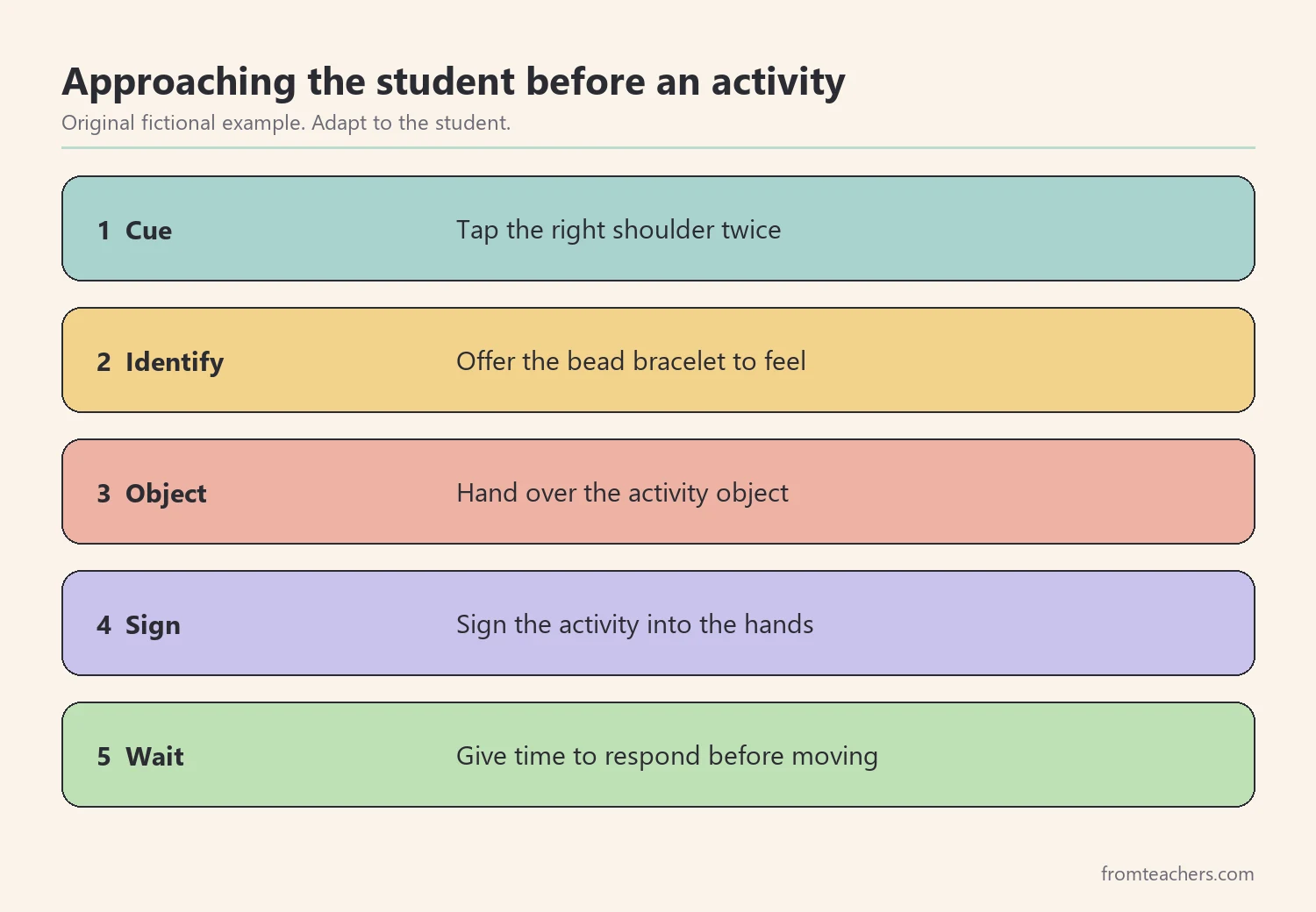
Similarly, use an If-Then pattern for tricky moments. If the student pulls away from a touch, then pause, offer your hand underneath theirs, and let them choose to follow. This hand-under-hand approach lets the student keep control.
3. Build predictable routines with a tactile calendar
Predictability is one of the most helpful supports you can offer. When the student knows what comes next, they can save their energy for learning. A tactile calendar, sometimes called a calendar box, makes the day something the student can hold.
To set one up, choose one real object for each activity. Place the objects in order in a row of boxes or on a sturdy strip. At each transition, guide the student to the calendar, find the next object together, and carry it to the activity.
Afterward, mark the end of each activity. Many teams use a “finished” box where the student drops the object. This small action closes one activity and opens the next.
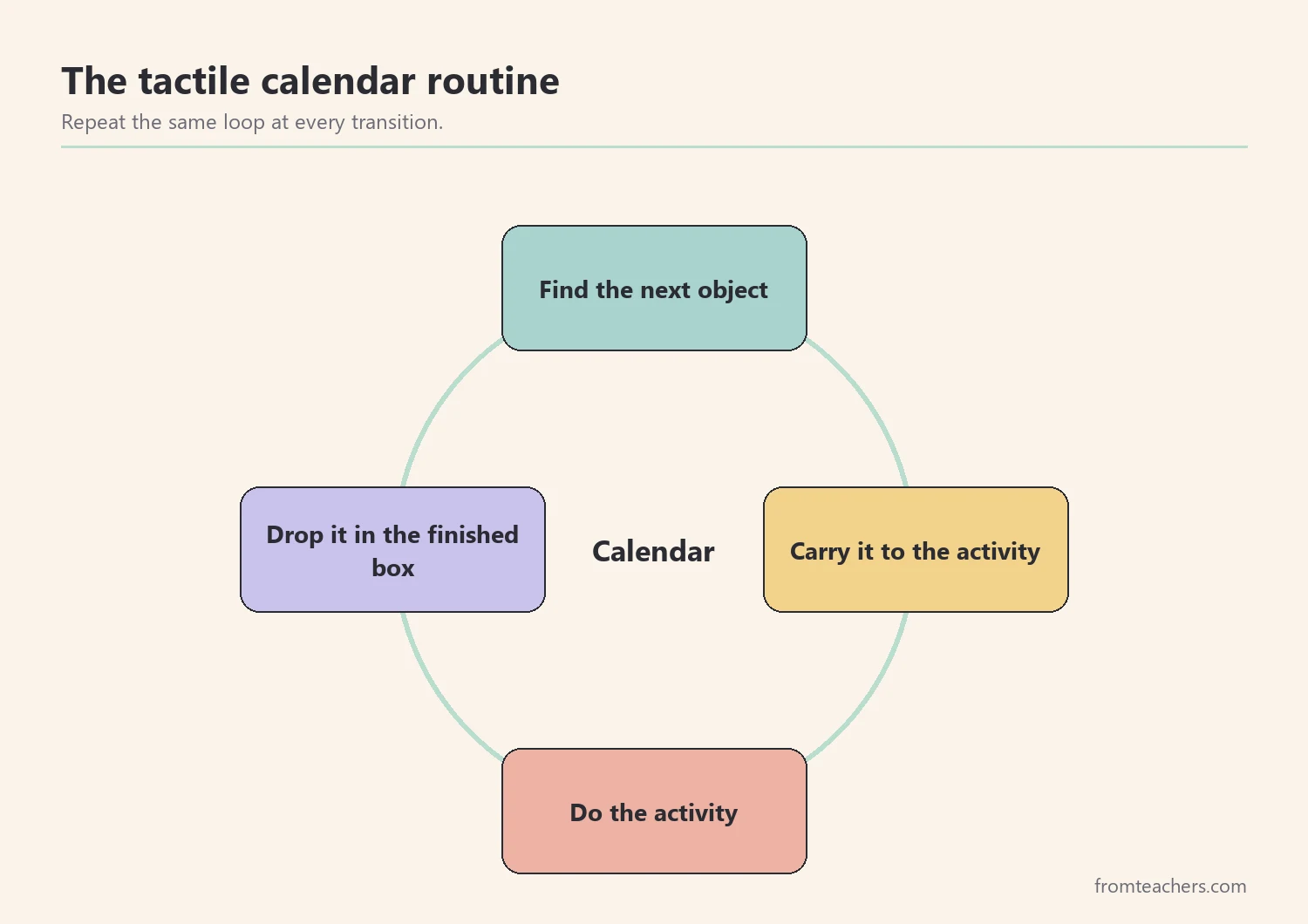
For Lina, the morning has four objects: a cup for snack, a book for reading, a ball for recess, and a spoon for lunch. At each change, her intervener taps her shoulder, guides her hands to the calendar, and lets her find the next object. Then Lina carries it with her and drops it in the finished box at the end.
Over time, the calendar can grow with the student. Some teams move from whole objects to smaller parts of objects, then to textured cards, and later to braille or print labels. However, move to a more abstract symbol only when the student reliably understands the current one, and change one symbol at a time.
For instance, Lina’s team plans to keep the real cup for several weeks before trying a smaller cup glued to a card. If Lina hesitates or looks confused, then they return to the real cup and try again later.
In addition, keep the room layout steady. Furniture that moves without warning can make the space feel unsafe. If something must change, then walk the new route with the student before the activity starts.
4. Adapt materials and the room for touch
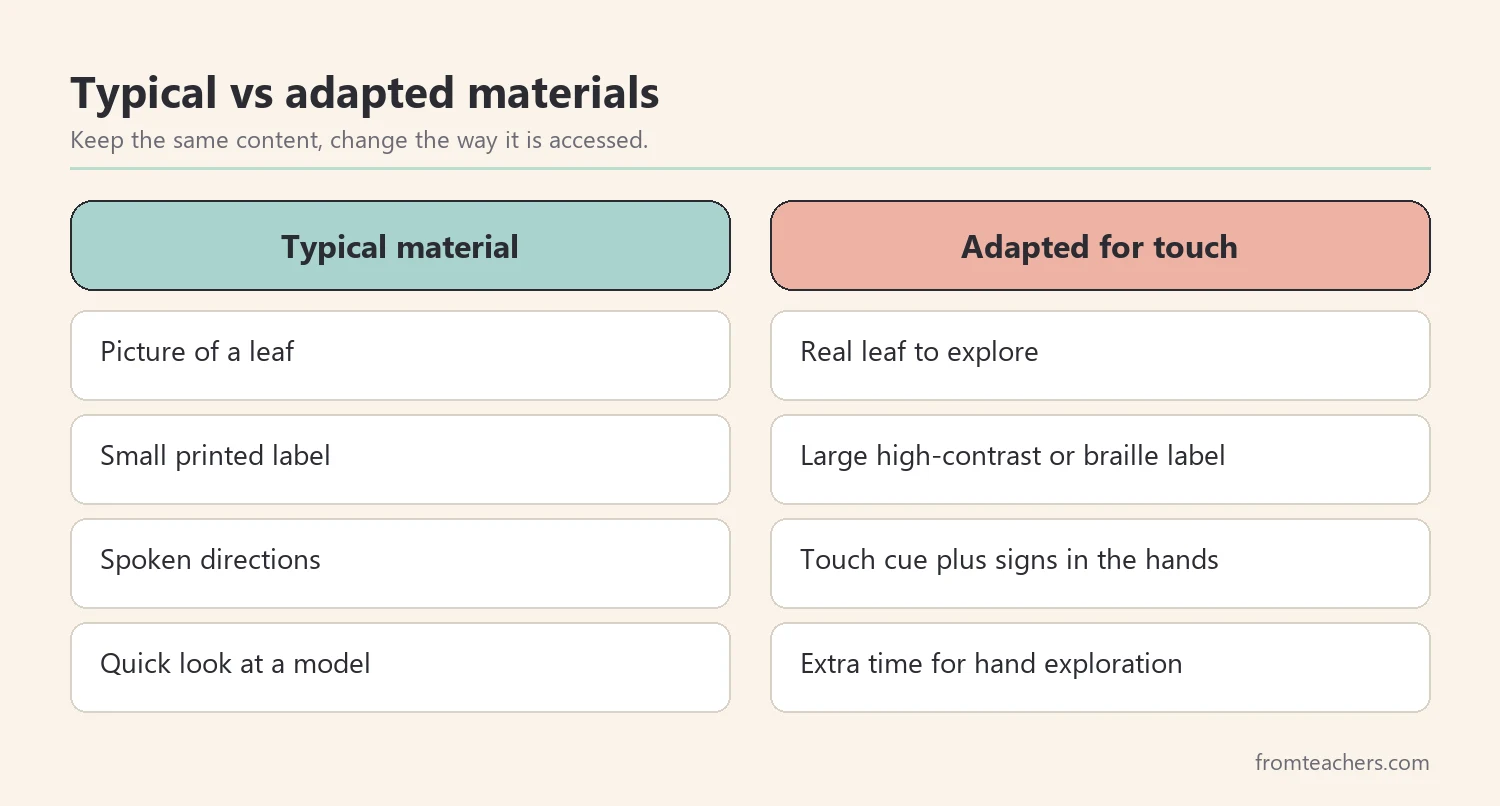
Many classroom materials depend on vision and hearing. Therefore, adapting them is a core part of deafblind classroom strategies. The aim is to give the student a way to explore the same content through touch and any usable vision.
Start with the lesson’s key idea, not every detail. Ask what one or two things the student most needs to explore. Then choose real objects, raised-line drawings, textured labels, or enlarged high-contrast images that carry that idea.
Next, plan time. Exploring by touch takes longer than looking. Build in extra minutes and avoid rushing the student’s hands from one item to the next.
For a science lesson on plants, Lina’s teacher brings a real leaf, a small pot of soil, and a cup of water. Lina explores each item with her intervener. Meanwhile, the class uses the same items at their tables, so Lina’s materials match the group lesson.
Also check the room itself. Reduce glare, use contrasting edges on tables, and keep a consistent spot for the student’s materials. If the student uses braille or tactile sign, then make sure every adult knows where those supports are kept.
5. Work with the intervener and the family as one team
Many deafblind students work with an intervener, a trained adult who provides access to information and communication. A clear partnership between the teacher and the intervener keeps instruction steady. Likewise, the family knows the student’s signs, preferences, and history better than anyone.
Begin by agreeing on roles. The teacher plans the lesson and its goals. The intervener helps the student access the lesson and communicate. Both share notes about what worked.
Then set up a simple communication loop with the family. A short daily note, written or with photos, can share one success and one question. If the family uses certain signs or object cues at home, then ask to use the same ones at school.
For this kind of collaboration, the If-Then strategy tables for supporting students with deaf-blindness include sections on partnering with families and collaborating with interveners, which can help the team agree on next steps.
Lina’s mother shares that Lina uses a cup at home to ask for a drink. As a result, the team adds the cup as a request symbol at snack time, not only as a calendar object. This small change gives Lina a new way to communicate in both places.
6. Track progress and review one goal at a time
Progress for deafblind students can be gradual, so a simple record helps the team see it. Choose one goal connected to the student’s plan and decide how you will count it. Keep the measure easy to collect during real activities.
For Lina, the goal is to find the next object on the tactile calendar with less help. Each week, her intervener counts how many of the 10 morning transitions Lina completes on her own. The numbers below are fictional and only show the format.
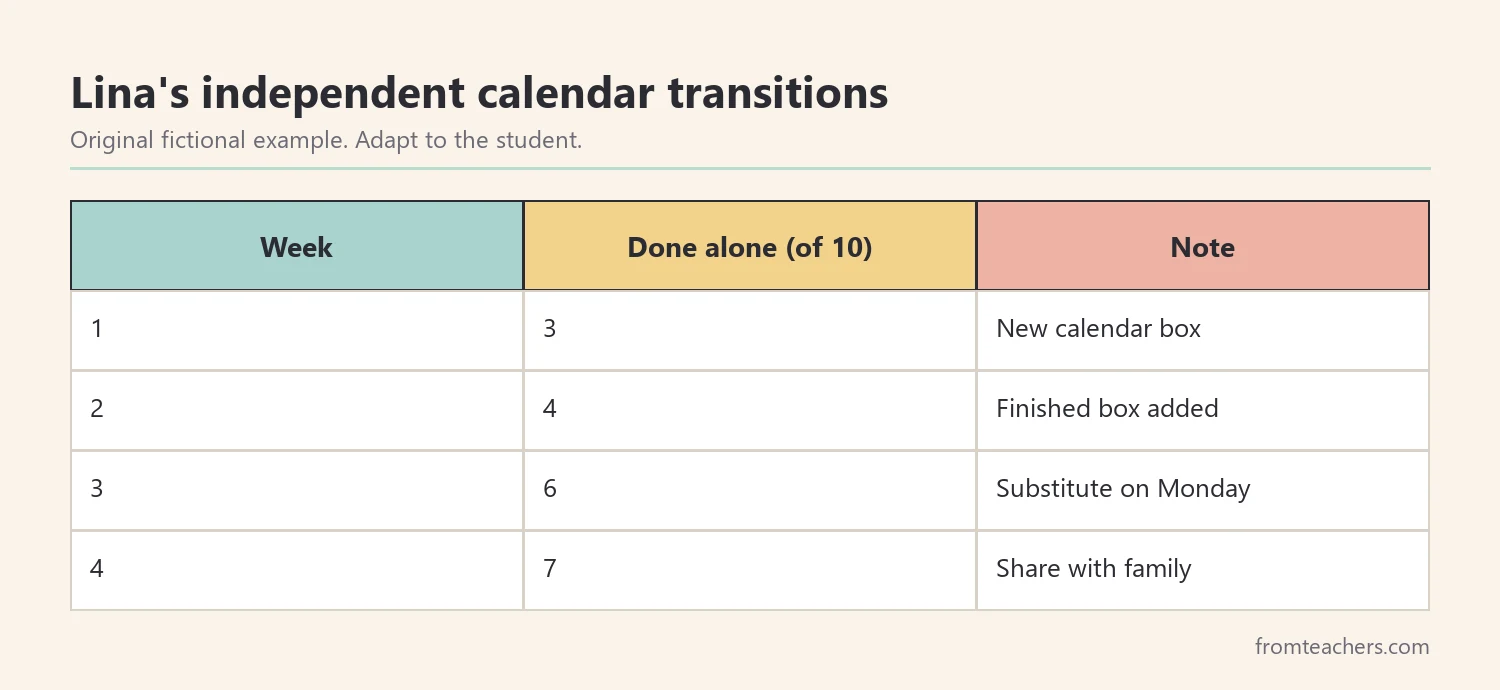
In this example, Lina moves from 3 of 10 transitions in week 1 to 7 of 10 in week 4. That change tells the team the calendar routine is working. Next, they might fade the shoulder tap at one transition and watch what happens.
Additionally, write a brief note beside each number. A note like “new intervener on Tuesday” or “fire drill after recess” explains a dip better than the number alone. These notes also help the team avoid changing a plan too quickly after one hard day.
When you choose the next goal, keep it close to the routines that already work. Strong deafblind classroom strategies build on each other, so a student who finds the next calendar object on their own may be ready to request a preferred activity with the same object.
Finally, review the record with the family every few weeks. Ask what they see at home, and decide together on one next step. Small, shared decisions keep everyone moving in the same direction.
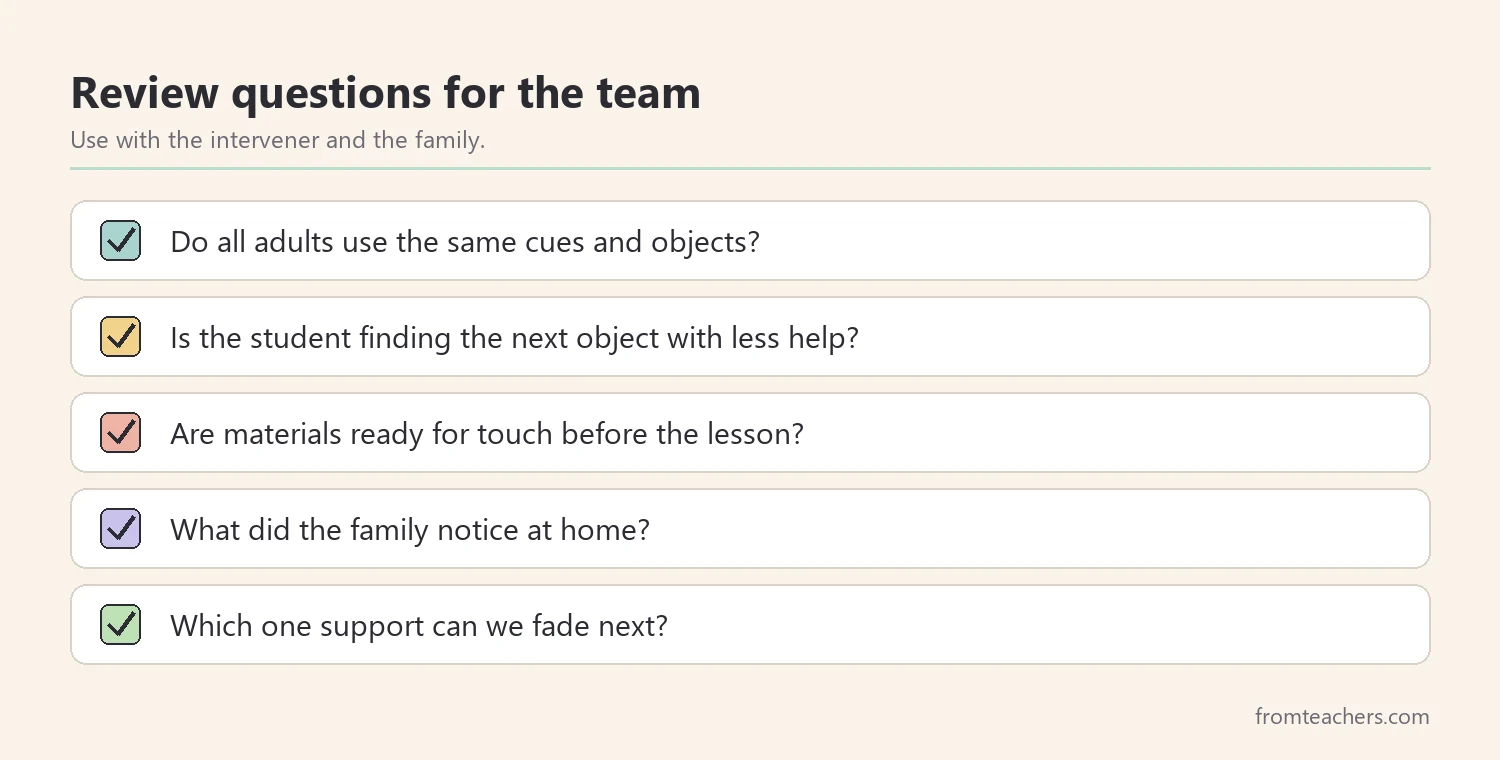
Common mistakes and how to avoid them
- Touching without warning. Fix: use the same “I am here” cue and personal identifier every time.
- Changing objects or cues between adults. Fix: list every cue and object in the access profile and share it with all staff.
- Rushing tactile exploration. Fix: plan extra time and let the student set the pace.
- Doing the task for the student. Fix: use hand-under-hand support so the student stays in control.
- Working apart from the family. Fix: use the same signs and objects at home and school when possible.
Questions teachers and parents ask about deafblind classroom strategies
Do all deafblind students have no vision or hearing?
No. Many students have some usable vision, hearing, or both. That is why learning how each student takes in information comes first.
What is the difference between hand-over-hand and hand-under-hand?
With hand-over-hand, the adult places their hand on top and moves the student’s hand. With hand-under-hand, the student rests their hands on the adult’s hands and can choose to follow or pull away. Many specialists prefer hand-under-hand because it respects the student’s control.
How many object symbols should we start with?
Start small, often with a few objects tied to daily activities the student enjoys. Add more once the student reliably connects those first objects to their activities.
What does an intervener do?
An intervener is a trained adult who helps a deafblind student access information, communicate, and connect with others. The teacher still plans instruction, and the two work as partners.
Where can families find more support?
Each state has a deaf-blind project, and national organizations offer free resources. The sources below are good places to start.
Related reading: Boost Access and Independence: An Assistive Technology Toolkit for Special Education, How Teachers Communicate With Parents in Special Education, and Special Education: A Complete Guide for Parents and Educators.
A companion resource for deafblind classroom strategies:
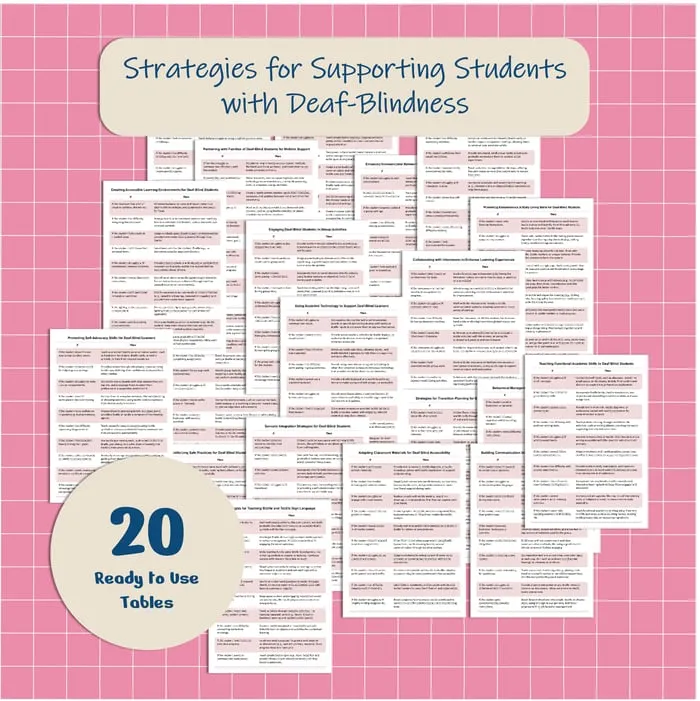
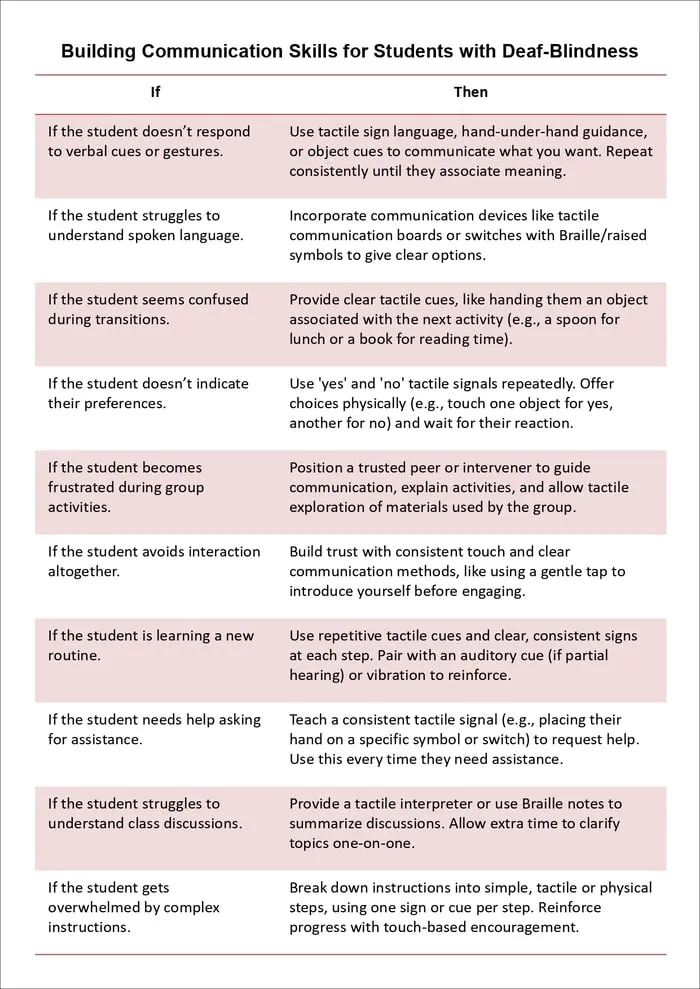
Strategies for Supporting Students with Deaf-Blindness: a printable PDF with 20 If-Then tables covering families, accessible environments, group activities, assistive technology, interveners, communication, braille and tactile sign, transition planning, and more.
Sources and scope
- National Center on Deaf-Blindness: free information for families and educators, including links to state deaf-blind projects.
- Perkins School for the Blind: resources on teaching students with visual impairments and deafblindness.
- IRIS Center, Vanderbilt University: free modules on evidence-based practices in special education.
- IDEA, U.S. Department of Education: the law behind special education services, which includes deaf-blindness as an eligibility category.
This guide covers everyday classroom strategies for access, routines, and teamwork. It does not cover medical evaluation, audiology, or orientation and mobility training, which belong to qualified specialists and the student’s team.
Key takeaways
- Strong deafblind classroom strategies start with a one-page access profile.
- Consistent touch cues and identifiers help the student feel safe.
- A tactile calendar makes the day predictable and easier to follow.
- Adapt materials for touch and give extra time to explore.
- Track one goal and review it with the intervener and the family.






Leave a Comment