

These AAC tips for paraprofessionals are for the adult who sits closest to the student all day. Picture a grade 3 math block. Leo uses a speech-generating device with a grid of symbols, and his paraprofessional, Ms. Diaz, is the one who decides, minute by minute, whether the device is on the desk, charged, open to the right page, and actually used.
That is a lot of responsibility, and many paraprofessionals receive little training for it. This list gives you ten practical habits, ranked from the easiest to start tomorrow to the ones that take more practice. By the end, you will know what to do with the device, what to say, what to write down, and when to pass a question to the speech-language pathologist or teacher.
Examples are fictional. Adapt to the student’s goals and agreed supports. Follow the plan written by the student’s team and SLP. This is guidance, not a diagnosis or therapy plan.
At a glance
- Keep the device with the student in every setting.
- Wait about ten seconds before helping.
- Model one or two key words on the student’s own device.
- Prompt from least to most and avoid hand-over-hand unless agreed.
- Write short notes and bring questions to the SLP.
How we ranked these tips
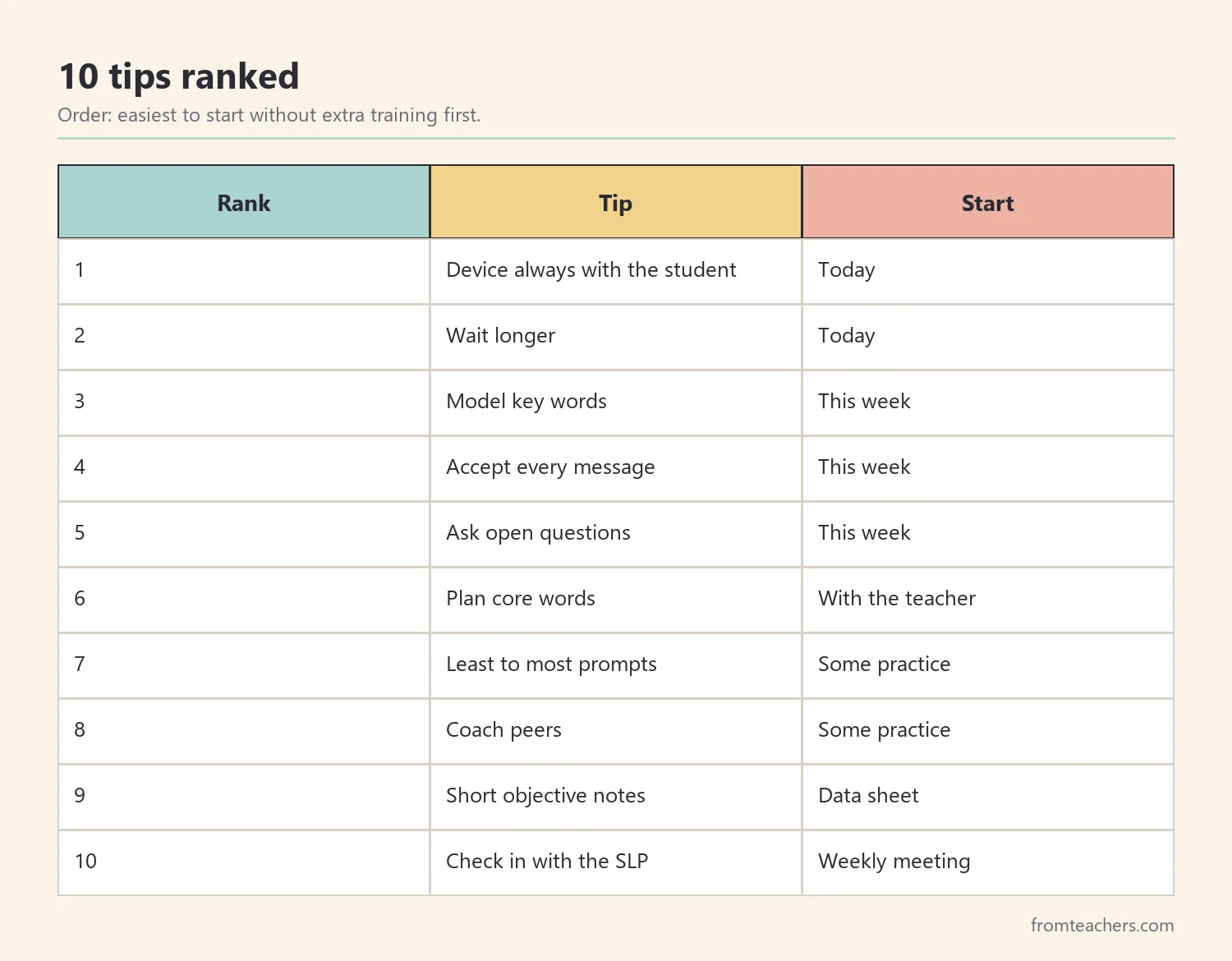
There is no official ranking of AAC habits, so we used one clear rule: how easy each tip is to start without extra materials or training. Tips at the top can begin in the next lesson. Tips near the bottom need some practice, a short talk with the SLP, or a simple data sheet.
In addition, every tip respects one basic idea promoted by organizations such as ASHA: the AAC system is the student’s voice, so it should be available and respected all day, not only in therapy.
The ready-made option: a shared AAC communication plan
Paraprofessionals often work from verbal instructions passed along in a hallway. A written plan is far easier to follow. The individual student communication plan for AAC in the classroom puts objectives, a communication activities overview (activity, when, frequency, objective, method), AAC communication targets with the target word or message and how it is accessed, progress notes with a comfort level from 1 to 4, and an evaluation section on one page.
As a result, the paraprofessional knows which words to model in which activity, and the whole team works from the same document.
1. Keep the device with the student, always
What it is: the device or communication board travels with the student to every class, recess, lunch, and bus line.
Why it works: a student cannot use words they cannot reach. Leaving the device in a backpack during lunch removes the student’s voice at the most social time of day.
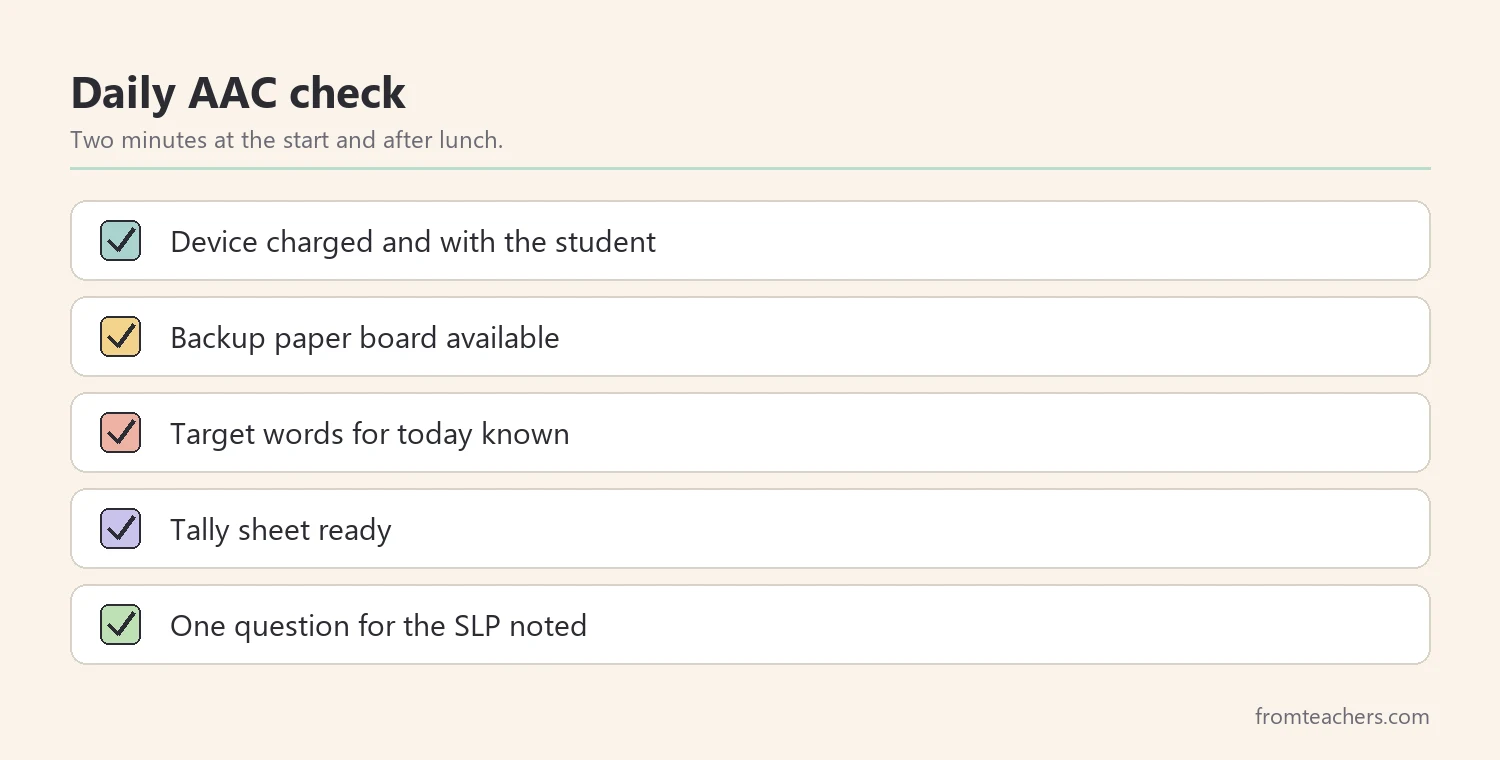
How to use it: make “device in hand” part of every transition. Check the charge at arrival and after lunch, and keep a low-tech paper board as a backup.
Example: Ms. Diaz added the device to Leo’s visual transition checklist. Within two weeks, Leo began picking it up himself before lining up.
2. Wait longer than feels comfortable
What it is: after you ask a question or pause in an activity, you wait quietly for a response before helping.
Why it works: finding a symbol, moving between pages, and planning a message all take time. Many adults jump in after a second or two, which teaches the student that someone else will answer.
How to use it: count silently to ten, keep an expectant look, and do not repeat the question right away. If nothing happens, model the answer (tip 3) instead of asking again.
Example: when Ms. Diaz waited, Leo navigated to the “more” button during snack without any prompt. Before, she had always said it for him.
3. Model words on the device as you talk
Modeling, sometimes called aided language input, is the most widely recommended of all AAC tips for paraprofessionals. You touch key words on the student’s own device while you speak, without requiring the student to copy you.
Why it works: children learn spoken language by hearing thousands of examples. AAC users need to see their language used too, on the same system they are expected to use.
How to use it: model one or two key words per sentence, not every word. For example, say “Let’s put the counters in” and touch “in.”
Example: during math, Ms. Diaz modeled “more,” “done,” and “help” about five times each lesson. Leo did not copy her at first, which is normal.
4. Accept every message, even off-topic ones
What it is: you respond to what the student says on the device, including unexpected words, as real communication.
Why it works: exploring words, sometimes called babbling on the device, is part of learning. If the student hears “No, not now” every time they press a button, they may stop trying.
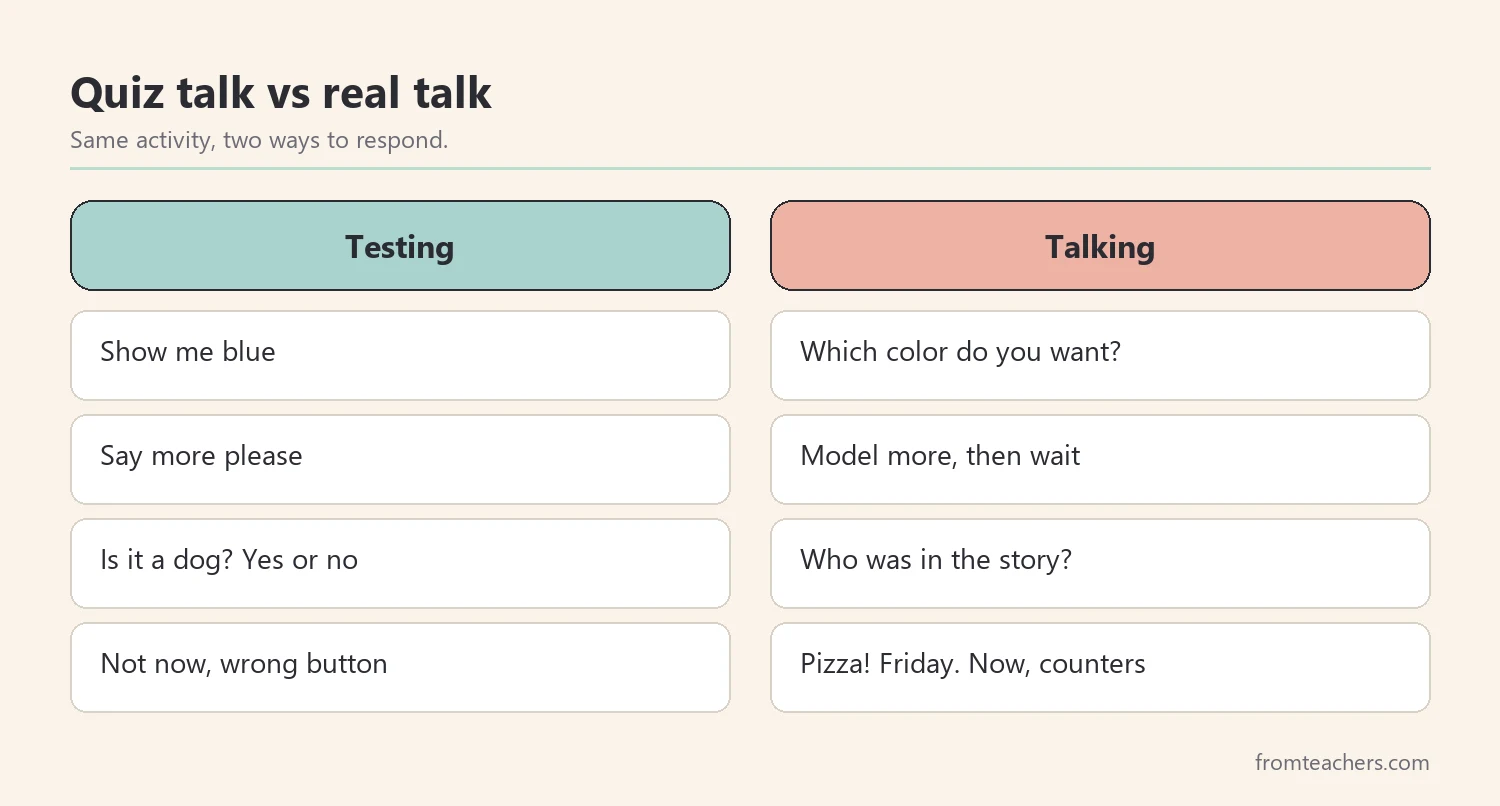
How to use it: respond briefly and naturally. If Leo says “pizza” during math, you can answer “Pizza! We have pizza Friday. Now, counters,” and model “now.”
Example: Ms. Diaz noticed that Leo’s “random” presses of “pizza” often came right before lunch. He was telling her he was hungry.
5. Ask open questions, not only yes or no
What it is: you give the student reasons to say more than one word.
Why it works: yes or no questions limit the student to two answers. Open questions and real choices invite new vocabulary.
How to use it: replace “Do you want the red one?” with “Which one?” and model two options. Instead of “Did you like the story?” try “What happened?”
Example: after a read-aloud, Ms. Diaz asked “Who was there?” and modeled “dog.” Leo pressed “dog” and “big,” his first two-word answer about a story.
6. Plan core words for each activity
What it is: before a routine, you and the teacher choose two or three high-use words to target, such as “go,” “stop,” “more,” “different,” or “help.”
Why it works: core words work across many activities, so practice in math also helps at recess. Planning keeps modeling focused instead of random.
How to use it: write the target words for each routine on a sticky note or in the communication plan. This is where a written list of AAC communication targets per scheduled activity saves time.
Example: Leo’s targets were “help” in math, “turn” in centers, and “go” at recess.
7. Prompt from least to most
What it is: if the student needs help, you start with the lightest support and only add more if needed.
Why it works: heavy physical prompts, such as moving the student’s hand, can create dependence and take away the student’s control of their own voice.
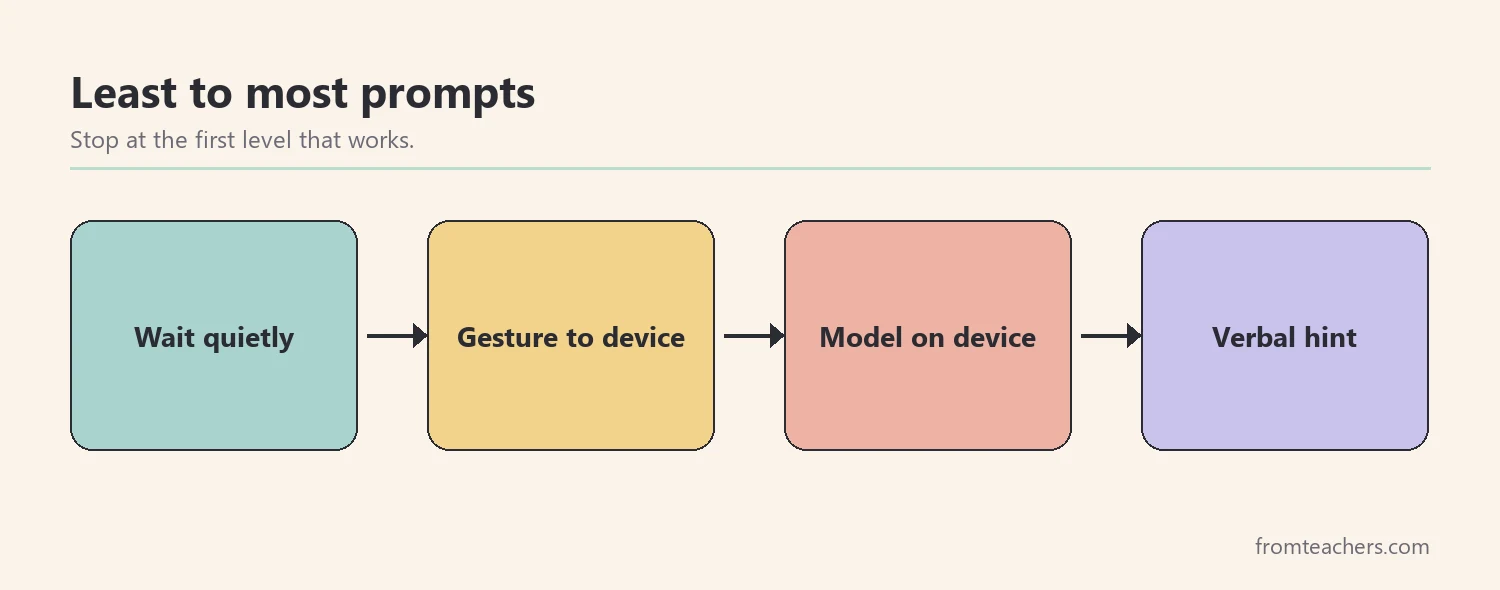
How to use it: try in order: wait, a gesture toward the device, a model on the device, then a verbal hint. Avoid hand-over-hand unless the SLP and team have agreed on it.
Example: Ms. Diaz noted that a simple point toward the device worked for Leo in most cases.
8. Help peers talk to the student, not about them
What it is: you coach classmates to wait, look at the student, and respond to their device messages.
Why it works: communication is social. If adults are the only partners, the student misses most of the language in the room.
How to use it: give peers simple jobs: “Ask Leo which game, then wait.” Step back when a conversation starts, so you do not become the go-between.
Example: during centers, a classmate waited for Leo to press “my turn.” Ms. Diaz moved one desk away.
9. Write short, objective notes
What it is: you record a few facts during the day: which words the student used, in what activity, and how much help was needed.
Why it works: the SLP and teacher cannot see every moment. Simple notes help the team see progress and adjust targets.
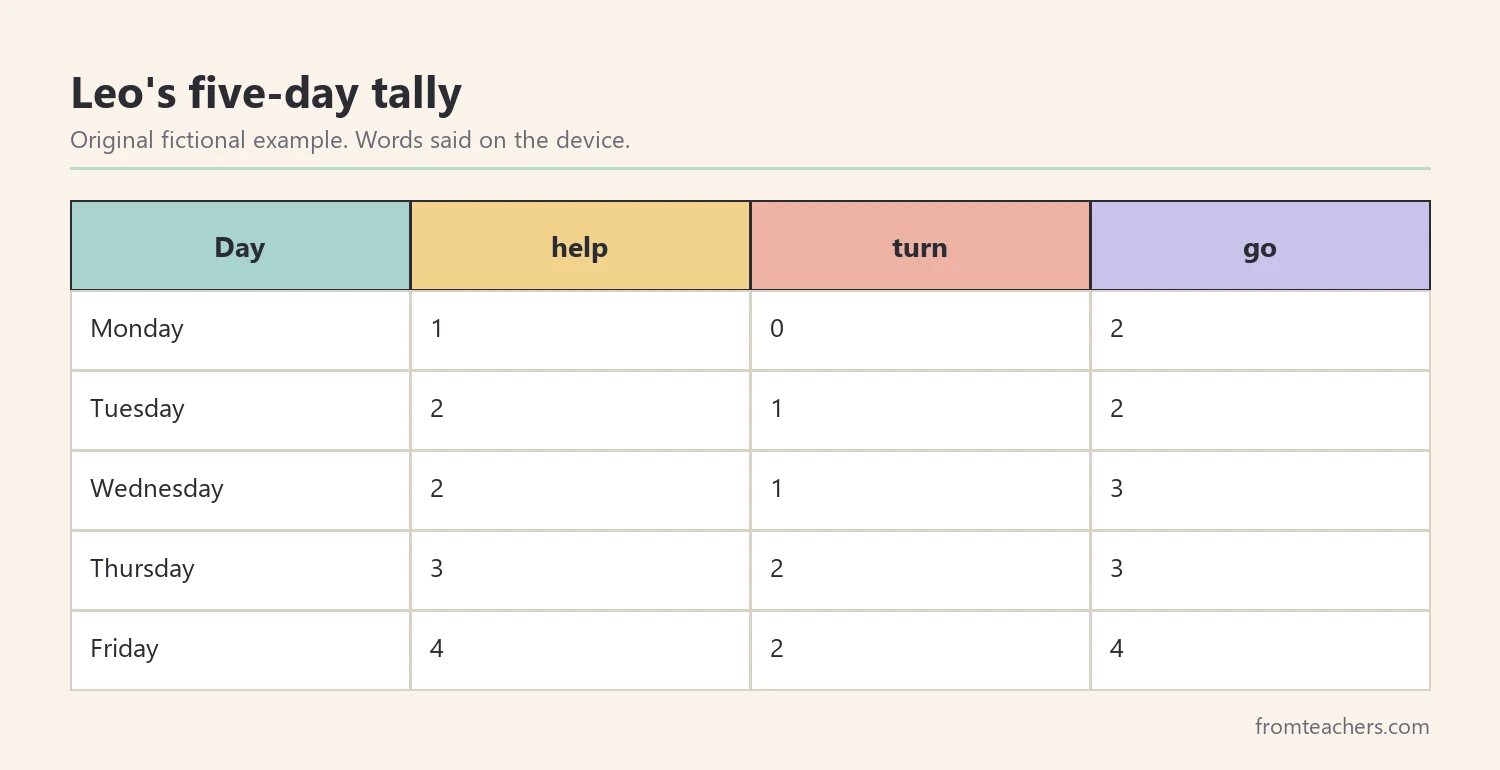
How to use it: use tally marks by word and prompt level. Write what you saw, not opinions. “Said ‘help’ 3 times, 2 with a gesture prompt” is more useful than “had a good day.”
Example: Ms. Diaz kept a five-day tally for Leo’s three target words, shown in Figure 3.
10. Bring questions to the SLP and teacher
What it is: you share what you notice and ask for guidance instead of changing the system yourself.
Why it works: changes to vocabulary, page layout, or access method are clinical and team decisions. Your observations make those decisions better.
How to use it: ask for ten minutes every week or two. Bring your notes and one question, such as “Leo looks for ‘outside’ but cannot find it. Can we add it?”
Example: after Ms. Diaz shared her tally, the SLP moved “help” to the home page, and Leo began using it faster.
Common mistakes and how to avoid them
- Device stored away “so it does not get damaged”: use a strap or case instead, and keep it within reach.
- Requiring the student to copy every model: modeling is input. Let the student watch and choose when to use words.
- Answering for the student: wait, model, then wait again before speaking for them.
- Testing instead of talking: “Where is blue? Show me cat” turns communication into a quiz. Talk about real things.
- Changing pages or settings alone: ask the SLP first, so the system stays consistent.
Questions teachers and parents ask about AAC tips for paraprofessionals
Do paraprofessionals need special training to support AAC?
Basic training from the SLP is very helpful, especially on modeling and the student’s specific device. However, the first tips on this list, such as keeping the device available and waiting, can start right away.
Will using AAC stop the student from talking?
This is a common worry. Organizations such as ASHA explain that AAC does not prevent speech development, and some students use more speech over time. Ask the SLP about the individual student.
How many words should I model at once?
Usually one or two key words per sentence. Modeling a full sentence word by word is slow and can lose the student’s attention.
What if the student presses the same button again and again?
Respond to it the first times, then model a related word. Repeated pressing is often exploration or a strong interest. Note it and share it with the SLP.
Where do I find the student’s AAC targets?
Ask the teacher or SLP for the student’s communication plan or IEP goals. If there is no written plan, suggest creating one so everyone models the same words.
Related reading: best assistive technology for special education classrooms, how teachers communicate with parents in special education.
A companion resource for AAC tips for paraprofessionals:
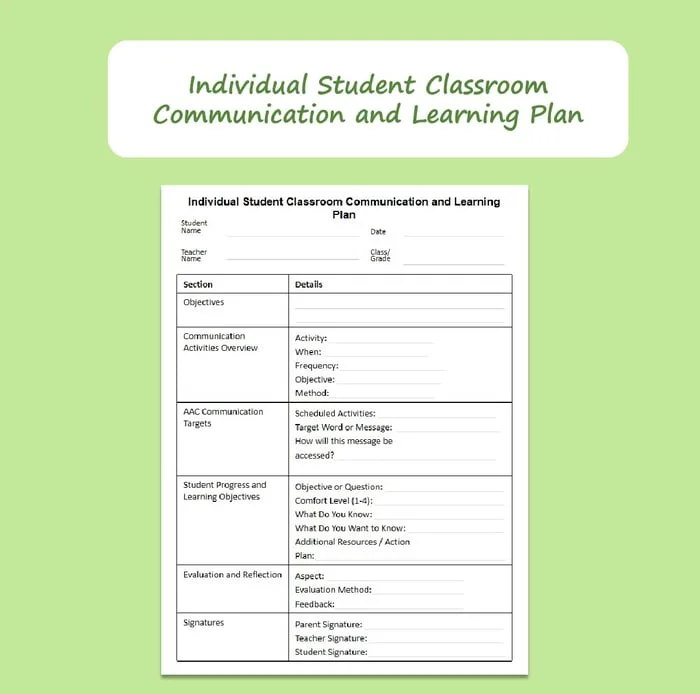
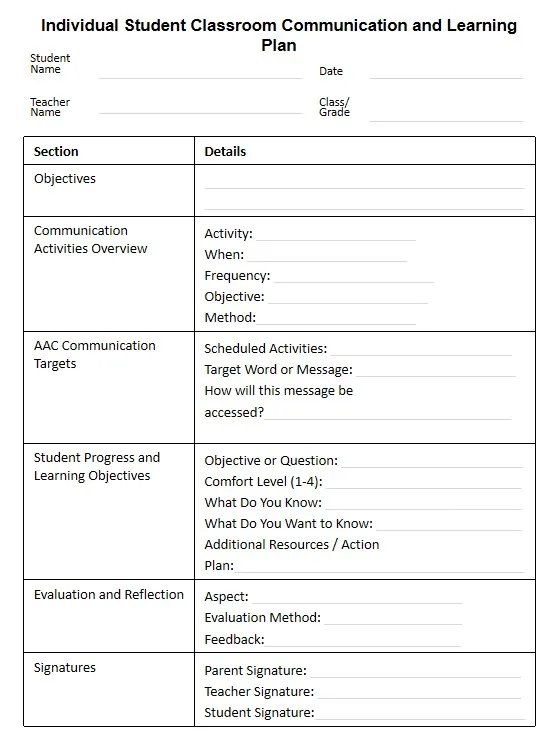
Individual Student Communication Plan AAC Learning Plan for Classrooms: a one-page plan with objectives, a communication activities overview, AAC communication targets per scheduled activity, progress and learning objectives with a comfort rating from 1 to 4, an evaluation and reflection section, and signature lines for parent, teacher and student.
You may also need: Classroom Observation Form for Special Education (SEN): 12 Daily Checklists.
Sources and scope
- ASHA: Augmentative and Alternative Communication: a public overview of AAC from the American Speech-Language-Hearing Association.
- ASHA Practice Portal: AAC: professional guidance on AAC assessment and intervention.
- IRIS Center: free modules for educators, including work with paraprofessionals.
- Center for Parent Information and Resources: plain-language information on IEPs and related services.
This list covers everyday classroom habits for paraprofessionals supporting AAC users. It does not replace training or decisions by the student’s SLP and IEP team.
Key takeaways
- The best AAC tips for paraprofessionals start with access: keep the device with the student all day.
- Wait, then model key words on the student’s own device without demanding copies.
- Accept every message and ask open questions to invite more language.
- Plan core words per activity and record short, objective notes.
- Bring observations to the SLP and teacher, who decide changes to the system.










Leave a Comment