

Choosing the right accommodations to track turns “I think the read-aloud helps” into a record you can show at the next IEP meeting. Picture a grade 4 teacher, Ms. Brooks, the night before a progress meeting. Jayden’s IEP lists six supports, and she is sure she used most of them, but she cannot say how often or which ones made a difference.
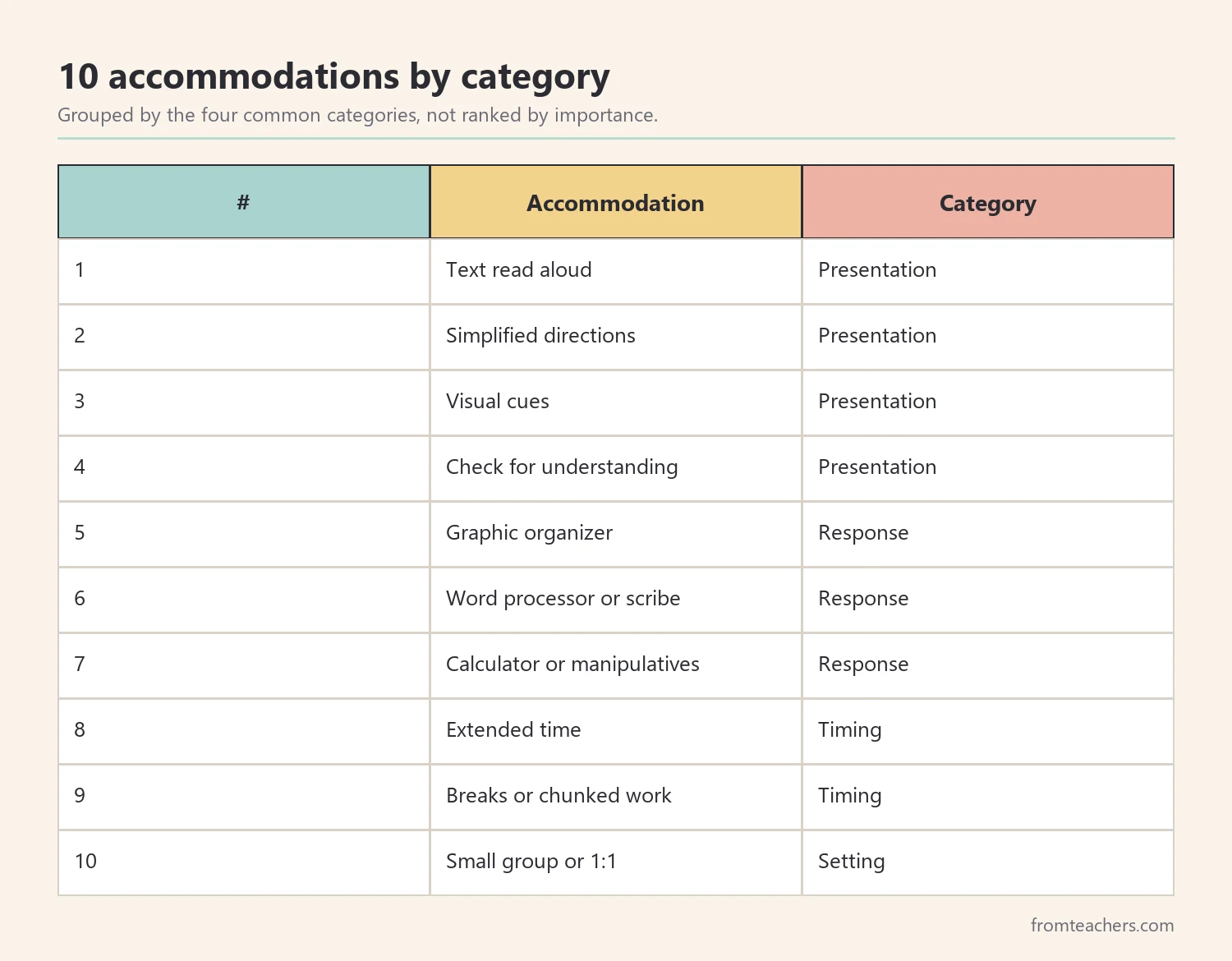
This list covers ten common accommodations that teachers often document, grouped by the four categories many schools use: presentation, response, timing and scheduling, and setting. By the end, you will know what to record for each one, how to keep tracking to a minute a day, and how to turn your notes into a clear summary for the team.
Examples are fictional. Track the accommodations listed in the student’s own IEP or 504 plan. This is guidance, not legal advice.
At a glance
- Track the supports listed in the student’s own IEP or 504 plan.
- Group them as presentation, response, timing and setting.
- Use a daily grid and detailed forms only for key tasks.
- Record level of success, not just whether a support was used.
- Summarize on one page before meetings.
How we ordered this list
We did not rank accommodations by importance, because the right ones depend on the student. Instead, we grouped them by four widely used categories. Presentation accommodations change how information is given. Response accommodations change how students show what they know. Timing and scheduling accommodations change when and for how long. Setting accommodations change where and with whom.
Therefore, you can scan the category that matches your student’s plan. Within each category, items appear in the order they usually show up during a lesson.
The ready-made option: an accommodations and modifications tracker
A tracker built for this purpose saves time. The accommodations and modifications tracker with editable IEP forms includes two forms. The Special Education Assignment Support Table is a grid where you log a student’s name and check off supports used across many assignments in one view, including read aloud, word processor, graphic organizer, extended time, visual cues, frequent breaks, scribe, 1:1 support, calculator, hands-on tools, and movement breaks.
Our Accommodations and Modifications Tracker is a detailed per-assignment form with the student’s name, date, assignment, type of task, location, observer, a checklist of supports used, and a level of success rating with notes.
1. Text read aloud (presentation)
What to record: which texts or questions were read aloud, by whom or by what tool, and whether the student completed the task.
Why track it: it shows whether reading is the barrier, or whether comprehension needs separate support.
Example: Ms. Brooks noted that Jayden finished science questions when they were read aloud, but not when he read them alone.
2. Simplified or repeated directions (presentation)
What to record: whether directions were shortened, repeated, or shown visually, and how many prompts were needed afterward.
Why track it: it shows whether the student understands the task before starting.
Example: With numbered directions on a card, Jayden needed one reminder instead of three, and he started work noticeably sooner.
3. Visual cues (presentation)
What to record: which visuals were used, such as icons, color coding, or examples, and for which tasks.
Why track it: it helps the team see which kinds of visuals support independence.
Example: A color-coded example problem helped Jayden set up multi-step math.
4. Check for understanding (presentation)
What to record: when a quick check happened and whether the student needed reteaching.
Why track it: it catches misunderstandings early, before a whole assignment goes wrong.
Example: A two-question check at the start of writing showed Jayden had misread the prompt, which saved the whole period. After a quick reteach, he wrote a response that matched the question.
5. Graphic organizer (response)
What to record: which organizer was used and whether the student used it independently.
Why track it: it shows whether planning support improves written work.
Example: With a three-box organizer, Jayden’s paragraphs had a clear beginning, middle, and end.
6. Word processor or scribe (response)
What to record: which tool was used and the length or quality of the response compared with handwritten work.
Why track it: it shows whether handwriting is limiting what the student can show.
Example: Jayden typed responses roughly twice as long as his handwritten ones on similar prompts.
7. Calculator or manipulatives (response)
What to record: when the tool was used and whether the goal was the concept or the calculation.
Why track it: it clarifies whether errors come from calculation or from understanding.
Example: With a calculator on word problems, Jayden’s errors dropped, showing that his reasoning was stronger than his calculation.
8. Extended time (timing and scheduling)
What to record: how much extra time was given and whether the student used it.
Why track it: extended time is common, yet teams rarely know whether students use it or need it.
Example: Jayden used extra time on most tests but rarely on short assignments, which helped the team refine the plan and explain the pattern to his family.
9. Frequent breaks or assignment broken up (timing and scheduling)
What to record: how many breaks were taken or how the assignment was divided, and whether the task was completed.
Why track it: it shows whether shorter work periods improve completion.
Example: With the assignment split into three parts, Jayden finished more often than with one long page.
10. Small group or 1:1 adult support (setting)
What to record: who provided support, for how long, and the level of support needed.
Why track it: it shows whether the student is becoming more independent or still relies on an adult.
Example: Ms. Brooks moved Jayden from 1:1 to small group support for reading as his records showed more independent work.
Keeping accommodations to track down to a minute a day
Tracking only works if it is quick. Start with the accommodations to track that appear most often in your week, then add the rest once the routine feels easy. Use a grid for daily check marks and a detailed form only for key assignments. Keep the tracker on a clipboard where you teach.
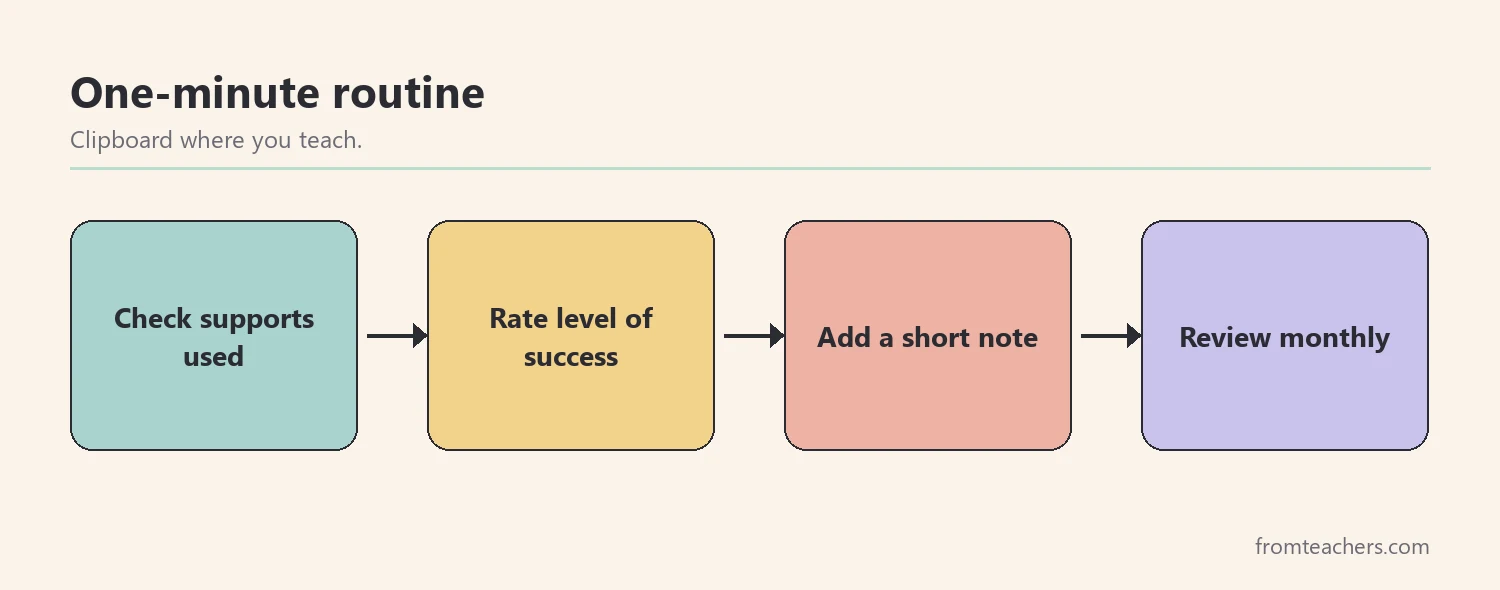
In addition, record the level of success, such as minimal, moderate, or maximum, alongside each check. That single rating turns a list of supports into useful evidence.
Here is Ms. Brooks’s summary of Jayden’s tracked accommodations over four weeks.
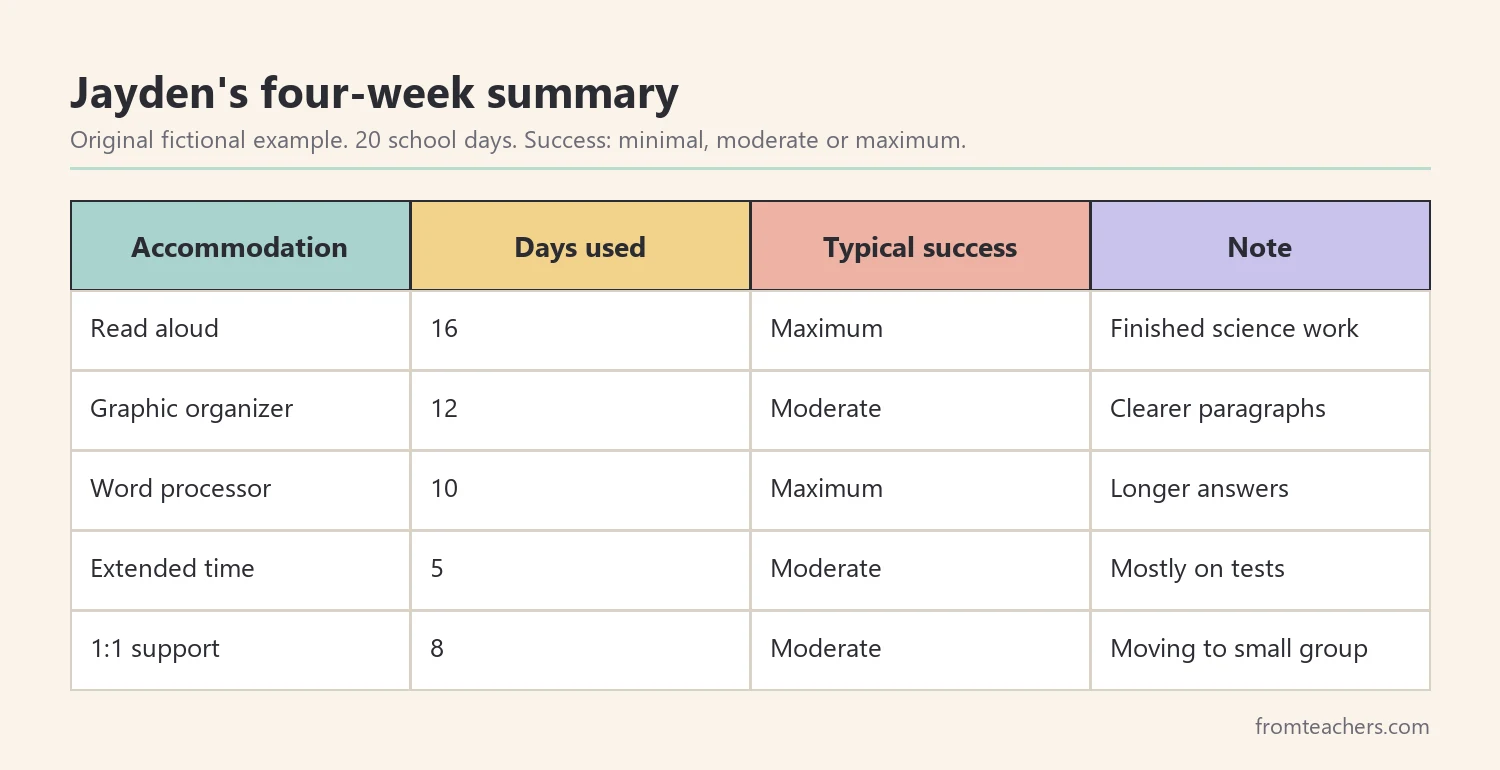
The pattern helped the team decide. Read aloud, the organizer, and typing were used often and linked with higher success. Extended time was used mainly on tests. As a result, the team kept all four and discussed reducing 1:1 support.
Getting the whole team to track the same way
A tracker filled in by one teacher shows one part of the day. However, many students receive supports from several adults: the classroom teacher, a special education teacher, a paraprofessional, and specialists. When each person records differently, the picture becomes hard to read.
First, agree on the form. Everyone should use the same grid and the same success ratings. Next, agree on the meaning of each rating. For example, “minimal” might mean the student completed little of the task even with the support, while “maximum” means the student completed it with the support and little extra help.
Then, decide where the tracker lives. A shared clipboard that travels with the student, or a digital copy everyone can open, prevents lost pages. Finally, set a monthly ten-minute check-in to look at the records together.
Using the records to adjust supports
Records are most valuable when they lead to decisions. Look for three patterns. First, supports used often with high success are working and should continue. Second, supports used often with low success may target the wrong barrier, so discuss alternatives with the team. Third, supports rarely used may no longer be needed, or the student may need help using them.
For example, Jayden’s records showed high success with typing and read aloud, while extended time was used mainly on tests. That insight helped the team describe extended time more precisely in his plan instead of adding more supports.
In addition, revisit the list of accommodations to track whenever the plan changes. A new support needs a row on the grid from day one, and a support that has been removed should come off the form so staff are not confused.
From tracker to IEP meeting
Before a meeting, summarize your records in a short table: accommodation, how often it was used, typical level of success, and one example. That one page is far more useful than a stack of forms.
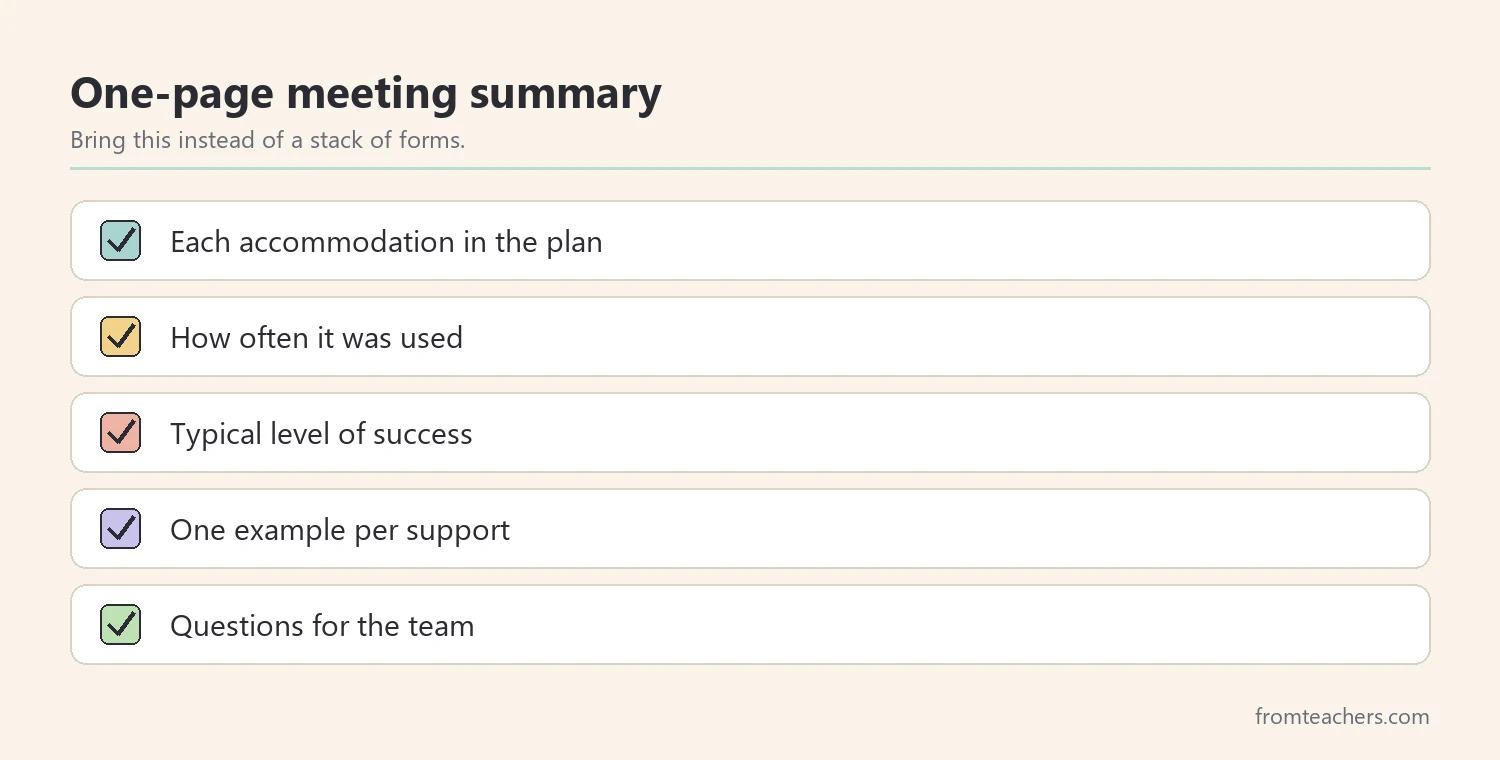
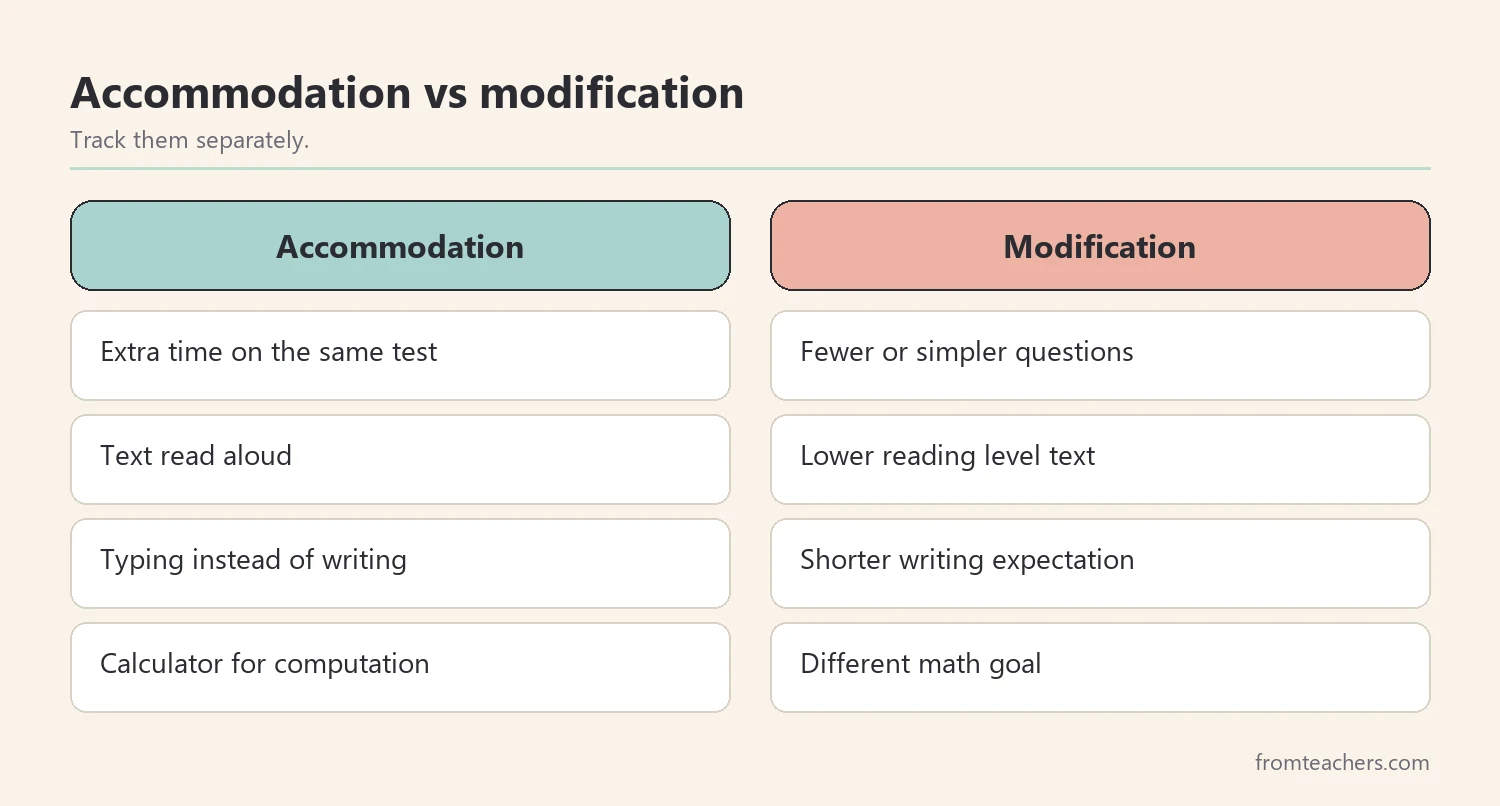
Also, separate accommodations from modifications. An accommodation changes how a student learns or shows learning, such as extra time. A modification changes what is expected, such as fewer or simpler questions. Tracking them separately helps the team discuss each clearly, especially when deciding about grading and progress.
Moreover, share the tracker with other staff. When paraprofessionals and specialists use the same form, the record shows the whole school day, not only your class.
Common mistakes and how to avoid them
- Tracking everything in great detail. Fix: daily check marks, with detailed forms only for key tasks.
- Recording use but not success. Fix: add a level of success rating.
- Mixing accommodations and modifications. Fix: track them in separate sections.
- Tracking only one class. Fix: share the form with all staff who work with the student.
- Waiting until the meeting to look at the data. Fix: review monthly.
Questions teachers and parents ask about accommodations to track
Do teachers have to document accommodations?
Requirements vary by district. Even when not required, documentation helps show that supports were provided and whether they helped.
How often should I record?
Daily check marks for regularly used supports, plus detailed notes on key assignments, work for many teachers.
What is the difference between an accommodation and a modification?
An accommodation changes how a student accesses or shows learning. A modification changes what the student is expected to learn or do.
Should families see the tracker?
A summary is usually most helpful. Share which supports are used most and how they help.
What if an accommodation is never used?
Note it and bring it to the team. It may not be needed, or the student may need help using it.
Related reading: Accommodations vs Modifications in Special Education, The Power of Data Tracking in Special Education, and Special Education: A Complete Guide for Parents and Educators.
You may also need: Classroom Accommodation Feedback Form IEP 504 Effectiveness Tracker.
A companion resource for accommodations to track:
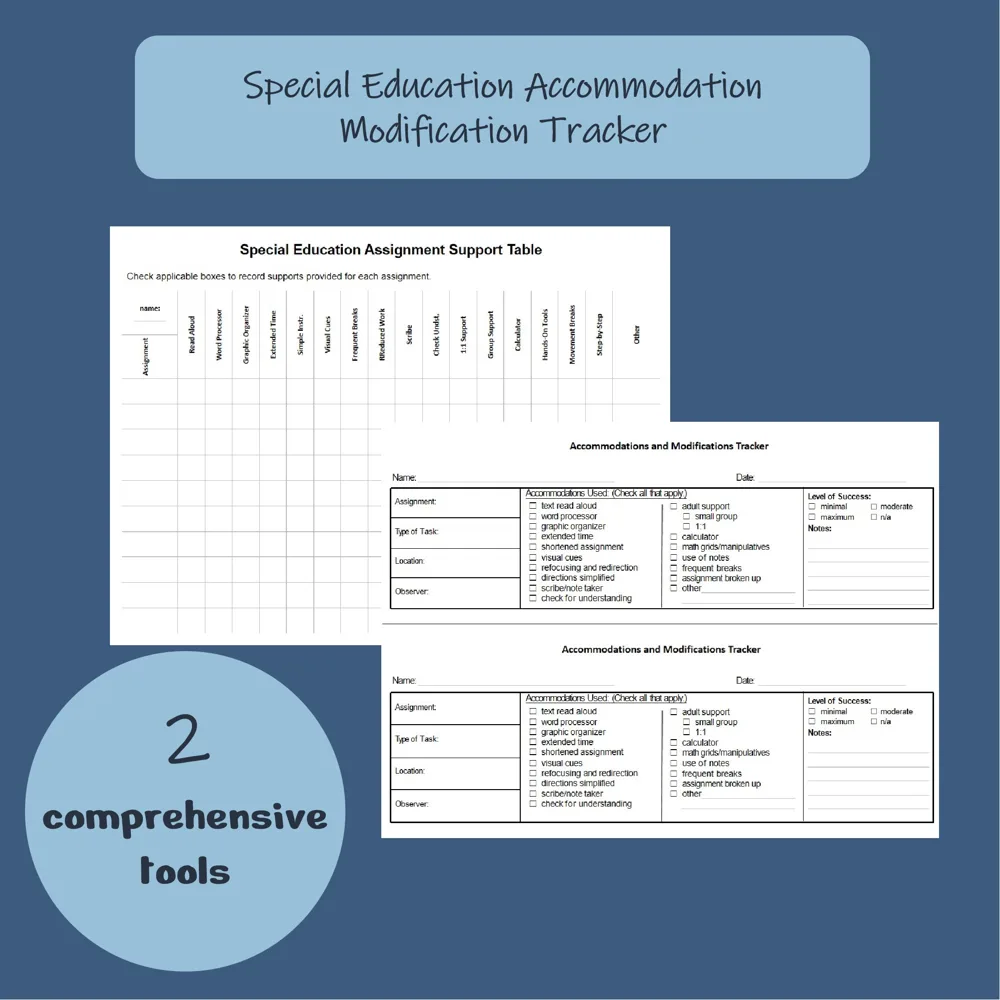
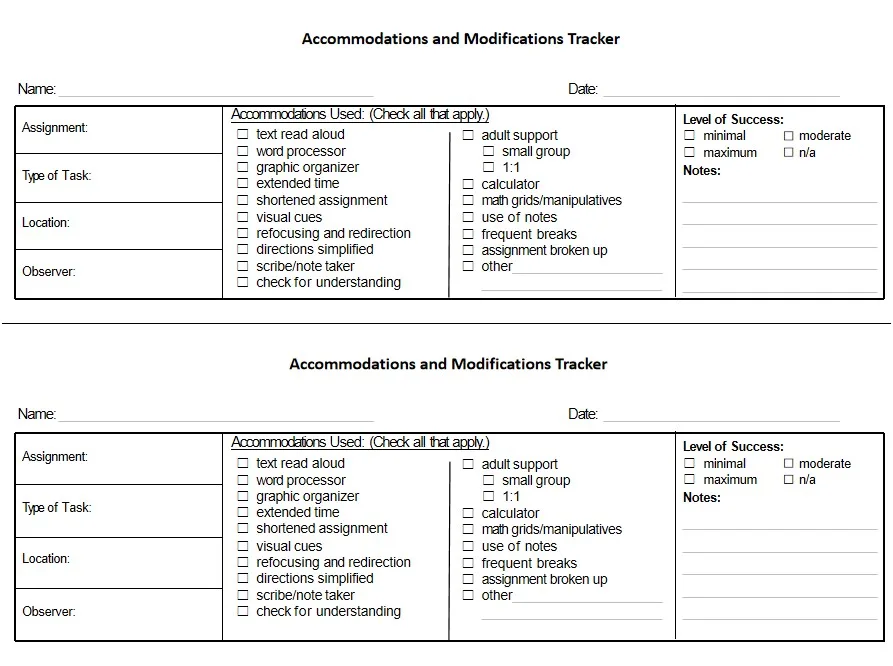
Accommodations & Modifications Tracker Editable Special Education IEP Forms: two tracking forms: a Special Education Assignment Support Table to check supports across many assignments in one view, and a detailed per-assignment tracker with date, task type, location, observer, supports used and level of success.
Sources and scope
- Center for Parent Information and Resources: information on IEPs, accommodations and progress reporting.
- Understood.org: articles explaining accommodations and modifications for families and teachers.
- Wrightslaw: information on special education law and documentation.
- CAST UDL Guidelines: a framework for flexible ways of presenting information and showing learning.
This list covers practical documentation of common classroom accommodations. It does not set legal documentation requirements, which vary by state and district.
Key takeaways
- Track the accommodations listed in the student’s own plan.
- Group accommodations to track by presentation, response, timing, and setting.
- Use a quick grid daily and detailed forms only for key tasks.
- Record level of success, not just use.
- Summarize on one page before meetings and keep modifications separate.






Leave a Comment