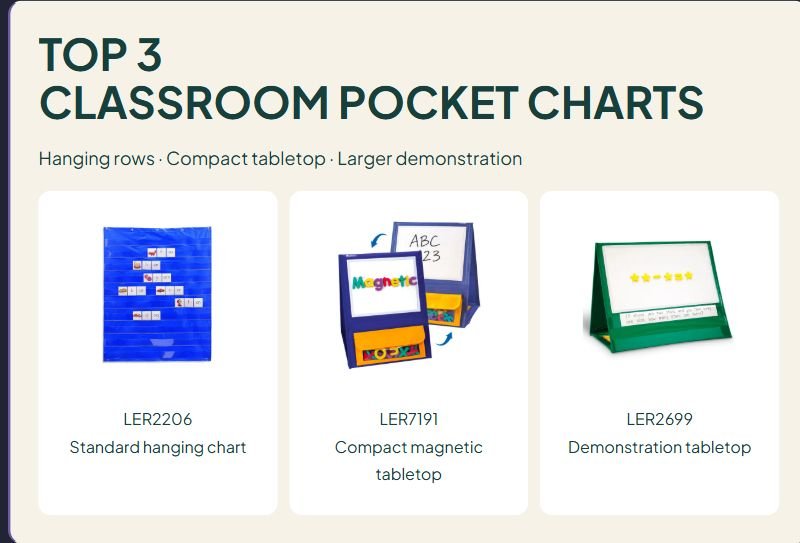

TOP 3
CLASSROOM POCKET CHARTS
Hanging rows · Compact tabletop · Larger demonstration

LER2206
Standard hanging chart

LER7191
Compact magnetic tabletop

LER2699
Demonstration tabletop
Affiliate disclosure: As an Amazon Associate I earn from qualifying purchases. Purchases through our links may earn a commission at no additional cost to you.
Classroom pocket charts can hold sentence strips, picture cards, and lesson prompts where students can see and move them. The right format depends on where you teach: an open wall, a small-group table, or a shared space that needs to be packed away.
This comparison looks at three Learning Resources designs with different display layouts. It is a product-information comparison, not a hands-on test or a ranking of measured durability. The numbers organize the guide; they do not mean that one chart is the right choice for every classroom.
Classroom pocket charts at a glance
| Model | Display style | Useful for | Main limitation |
|---|---|---|---|
| Standard LER2206 | Hanging chart with 10 clear rows | Multiple lines of word or sentence cards | Needs a suitable hanging location |
| Magnetic tabletop LER7191 | Compact, double-sided magnetic write-and-wipe display | Close-up work with compatible magnetic pieces | Not a substitute for a large hanging row display |
| Demonstration tabletop LER2699 | Larger magnetic board with two strip pockets per side | Writing or magnetic modeling alongside a few strips | Two rows per side limit simultaneous strip displays |
These are lesson displays, not individual student mailboxes. Match the model number when comparing listings: similar names can refer to substantially different sizes and layouts.
Three classroom pocket charts to compare
1. Learning Resources Standard Pocket Chart LER2206: for hanging rows
The LER2206 measures 33½ inches wide by 42 inches tall and has ten transparent rows. Grommets provide hanging points, and a rear pocket stores spare materials. The manufacturer says cards are not included; a compatible chart stand is sold separately.
Advantage: The row layout gives you room to organize multiple lines without taking over a teaching table.
Limitation: Plan the mounting location before buying. A large hanging chart may be awkward in a room without an accessible display area.
Choose it when: You want students to build or rearrange several lines of cards while keeping the tabletop clear.
LER2206 manufacturer details and photo source
2. Learning Resources Magnetic Tabletop Pocket Chart LER7191: for close-up magnetic work
The LER7191 stands on a table and provides magnetic write-and-wipe surfaces on both sides. It folds flat and includes three storage pockets. Magnetic letters, numbers, and tiles are separate purchases.
Advantage: It brings a reusable display to a small teaching station and provides a place to keep the next activity’s pieces.
Limitation: Do not expect the ten horizontal rows of the standard hanging chart. Check that the surface layout suits your cards and magnetic materials.
Choose it when: You teach across a table and want a compact surface for arranging a small number of pieces.
LER7191 manufacturer details and photo source
3. Learning Resources Demonstration Tabletop Pocket Chart LER2699: for a larger modeling surface
The LER2699 measures 24 inches across by 20 inches tall. Each side has a 22-by-12½-inch magnetic write-and-wipe area and two transparent sentence-strip pockets. It folds for storage and has carrying handles and two storage pockets.
Advantage: The layout pairs a broad modeling surface with a small number of strip rows.
Limitation: Two strip pockets per side are restrictive if a lesson requires many visible lines. Its larger format also needs more table space than a compact display.
Choose it when: Writing or magnetic modeling is the main activity and sentence strips provide a supporting prompt.
LER2699 manufacturer details and photo source
How to choose a pocket chart for your classroom
Start with the finished lesson
Lay out the cards or strips you actually intend to use. Count the rows and check the total width of your longest example. A short word-building task and a five-sentence sequencing activity have different display needs. Buying extra surface area does not solve a shortage of the right kind of pockets.
Measure cards after any finishing
A border added by laminating can change whether a card slides comfortably into a pocket. Make one sample before preparing a class set. Check both the part that enters the pocket and the amount of printed material that remains visible. Avoid a design that hides the bottom line of text behind a seam.
Decide who needs to reach the display
Choose a position based on the intended users. A teacher-only prompt can sit differently from a chart students need to manipulate. Check the reach, approach space, and sightline for the people who will use it. If access is difficult, consider a smaller working set placed closer to the learner instead of filling every available row.
Check the whole setup cost
Make a separate list for mounting hardware, a stand, blank strips, markers, magnetic pieces, and card storage. Product photos can show a suggested activity rather than everything supplied in the box. Confirm the current package contents and use equipment that is compatible with your display and school rules.
Plan for a clear view
Test a sample card at the actual reading distance. Use high contrast, generous text, and a simple layout. Check whether room lighting reflects off a transparent pocket. A chart can organize a lesson, but it does not guarantee that every student can read the material from across the room.
Choose a storage routine
Keep one labeled envelope or folder for each activity. Store its prompt cards, answer key, and reset instructions together. Photograph or sketch the intended arrangement for staff reference if appropriate, without including private student information. A predictable reset routine can matter more than a few extra pockets.
A practical setup for a first lesson
- Choose one objective. For example, arrange three events in order, rather than filling the display with unrelated tasks.
- Prepare a small card set. Check the fit with one finished sample before making duplicates.
- Place the display. Verify that students can see it and, when needed, reach the working area.
- Model one move. Demonstrate how to place, remove, and return a card.
- Check access during use. Offer a closer or alternative format when the display does not meet a learner’s needs.
- Reset and store. Return each card to its activity folder and follow the manufacturer’s care instructions.
For sequencing, begin with three familiar steps and leave space between them. Ask students to explain the order before introducing distractor cards. For word sorting, keep the category labels visible and place only the current set in the working area. These are lesson ideas, not claims that a particular chart improves outcomes.
For preparing reusable cards, compare our laminators for teachers and classroom paper cutters. Our label maker comparison can help with labeling activity folders and storage.
What to check in customer feedback
Read comments for the exact model number and classroom task. Look for clear descriptions of pocket stitching, stability on the intended surface, folding, marker cleanup, and card fit. A review of a different size or bundle may not describe the version you are considering. We have not reproduced customer excerpts or assigned review scores in this guide.
Classroom pocket chart questions
Can any pocket chart hold magnetic letters?
No. A transparent pocket row and a magnetic board are different features. Check that the specific model has a suitable magnetic surface and that your pieces are compatible.
Do I need a stand?
A self-standing tabletop design supports itself on a suitable table. A hanging chart requires an appropriate mounting arrangement; a separate stand is one possible option. Check compatibility rather than assuming all stands fit all charts.
Are cards and teaching pieces included?
Check the current listing’s package contents. Activity pictures can show accessories. Plan for your own lesson cards and any compatible magnetic pieces unless the specific package explicitly includes them.
Which layout should I choose?
Shortlist the standard hanging chart for multiple visible rows, the compact magnetic tabletop chart for close-up work, and the larger demonstration chart for a broad modeling area with a few strip prompts. Pick the format after laying out one real lesson.







Leave a Comment