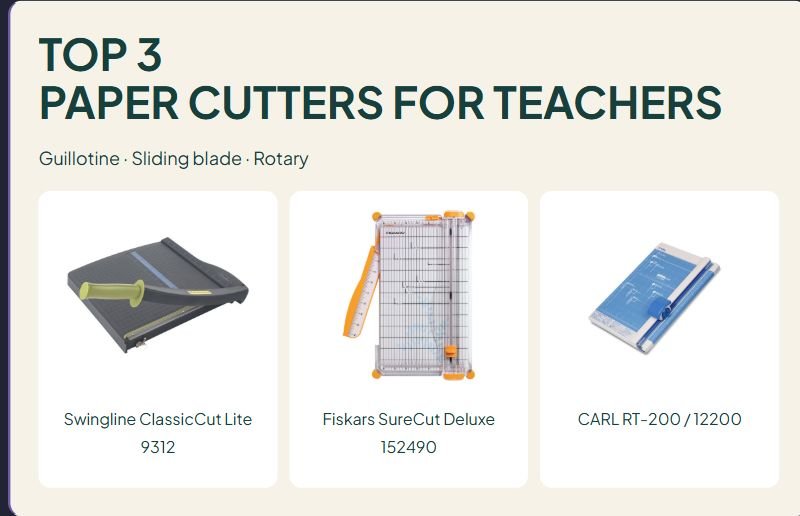

TOP 3
PAPER CUTTERS FOR TEACHERS
Guillotine · Sliding blade · Rotary
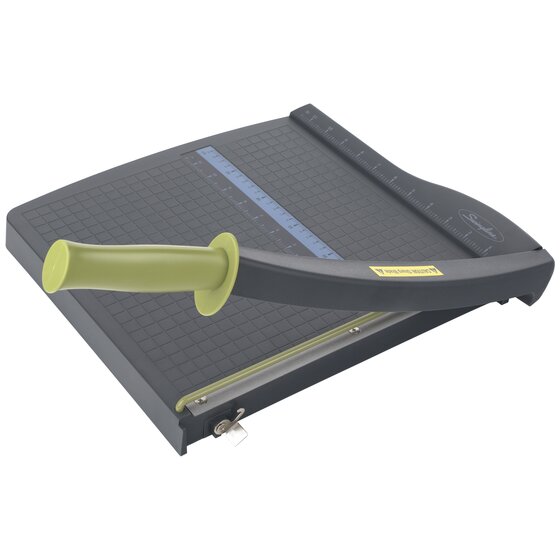
Swingline ClassicCut Lite 9312

Fiskars SureCut Deluxe 152490

CARL RT-200 / 12200
Affiliate disclosure: As an Amazon Associate I earn from qualifying purchases. Purchases through our links may earn a commission at no additional cost to you.
Paper cutters for teachers can make preparing task cards, labels, and lesson materials more manageable. The right choice depends on how you position the paper, how often you repeat a cut, and which materials you use. A large sheet-count claim is less useful if the cutter is awkward to line up for your everyday projects.
This guide compares three 12-inch-class trimmers with different mechanisms: Swingline ClassicCut Lite 9312, Fiskars SureCut Deluxe 152490, and CARL RT-200. We used manufacturer information and verified U.S. Amazon listings. We have not tested cutting accuracy, effort, blade life, or classroom durability. The choices describe different workflows rather than a measured performance ranking.
Paper cutters for teacher prep at a glance
| Model | Mechanism | Useful feature | Consider for | Main limitation |
|---|---|---|---|---|
| Swingline 9312 | Guillotine arm | Alignment grid, fixed guard, blade latch | Repeated straight cuts on letter-size paper | Maker recommends maximum paper size of 8½ × 11 inches |
| Fiskars 152490 | Sliding blade carriage | Wire cut-line and swing-out measuring arm | Positioning cuts around printed designs | Measuring-arm reach is not cutting length |
| CARL RT-200 | Rotary blade | Calibrated metal base and replaceable cutting mat | A rotary workflow with serviceable consumables | Blade and mat replacement add upkeep |
Sheet ratings depend on paper type and thickness. Swingline specifies up to ten sheets of 20 lb paper; CARL lists ten sheets of 20 lb paper with its straight blade. Do not carry those ratings over to cardstock, laminated sheets, or decorative blades.
Three trimmers to compare for teacher preparation
1. Swingline ClassicCut Lite 9312: for a guillotine workflow
The 9312 has a 12-inch cutting length, a plastic base with non-slip feet, a grid, and a dual-scale ruler. A fixed guard rail sits beside the blade, and a latch holds the cutting arm down for storage. Swingline recommends a maximum paper size of 8½ × 11 inches because of the guard arrangement.
Why consider it: The arm-style mechanism is a familiar option for repeated straight cuts. The printed guides can help you position batches consistently when the project fits the working area.
Limitation: A 12-inch blade does not mean every 12-inch-wide craft project fits conveniently. Check the paper-size restriction rather than selecting solely by blade length. The detached handle also needs to be fitted according to the instructions.
Prep-room fit check: Leave room to raise and lower the arm, support the sheet, and operate the latch. Keep the whole setup on a stable work surface.
Swingline ClassicCut Lite 9312 manufacturer information
Check Swingline ClassicCut Lite 9312 on Amazon.com →
2. Fiskars SureCut Deluxe 152490: for seeing the cut position
The SureCut Deluxe uses a wire cut-line to show the blade path. Its TripleTrack system guides the sliding blade carriage, and a swing-out arm extends the measuring area beyond 15 inches. The product’s cutting length remains 12 inches.
Why consider it: The visible cut-line may be useful when trimming around printed borders or leaving a particular margin. The measuring extension helps support and position a wider sheet.
Limitation: The extended ruler does not turn this into a longer cutter. Also confirm replacement-blade compatibility: Fiskars identifies high- or low-profile TripleTrack blades, style I, for this model. Similar orange replacement blades are not automatically interchangeable.
Prep-room fit check: Open the measuring arm on the table and place one real project on the deck. Check that the arm is supported and you can read the measurement without moving the paper.
Fiskars SureCut Deluxe 152490 manufacturer information
Check Fiskars SureCut Deluxe 152490 on Amazon.com →
3. CARL RT-200: for a rotary blade and replaceable mat
The original RT-200, also identified as CUI 12200, uses a rotary blade and a calibrated metal base. CARL lists a 12.20-inch cutting length and a ten-sheet capacity for 20 lb paper with the straight blade. Its replacement cutting mat is RM-12/2, and the original model uses B-series blades.
Why consider it: Named replacement parts make it possible to check the ongoing supply needs before buying. The base also includes common paper and photo-size guides.
Limitation: This is the original RT-200, not RT-200N. CARL lists different blade families for those models, so verify the suffix before ordering spares. Decorative-blade limits differ from the straight-blade rating.
Prep-room fit check: Check the base footprint, paper movement, and space needed to move the carriage through its complete travel. Keep the correct part numbers with the school’s equipment records.
CARL RT-200 / 12200 manufacturer information
Check CARL RT-200 / 12200 on Amazon.com →
What to check before buying a classroom paper cutter
Match the cutter to actual materials
List the projects you make most often: plain-paper cards, labels, photos, or thicker resources. Check the manufacturer’s guidance for those exact materials. A ten-sheet paper rating does not tell you how many layers of a different material it can cut. If a material is not supported, choose a suitable tool rather than forcing it through.
Separate cutting length from paper support
Cutting length describes how far the blade can travel. The base, fences, guard, and measuring arm determine how you position a sheet. Check both dimensions for an oversized project. If you need to trim a long edge in one pass, measure that edge before choosing a 12-inch-class model.
Check consumables and total cost
Look up the exact blade, mat, or other replacement parts before purchasing. Record the model number and suffix. Include the cost of compatible spares when comparing options, but avoid buying a generic replacement solely because its shape looks similar.
Plan use and storage
These comparisons concern adult teacher preparation. Follow the specific tool’s instructions and your school’s procedures for access, guards, operation, and storage. A guard or latch does not make a cutter suitable for unsupervised children. Keep the blade area clear and do not remove a guard to fit a larger project.
Read reviews for your kind of task
Useful customer feedback names the exact model, paper weight, number of sheets, time owned, and project type. Look for descriptions of alignment, paper movement, and replacement-part experience. A review about one thin sheet does not establish batch performance. We have not reproduced Amazon reviews or assigned ratings to these products.
A task-card cutting plan to try first
- Check the printed layout. Confirm that borders and text leave enough space for the planned cuts.
- Trim one sample. Use the intended paper and a supported material thickness.
- Check both dimensions. Place the finished card in its actual pouch, sleeve, or storage box.
- Choose a repeatable sequence. Decide which long cuts come first and how the remaining strips will be supported.
- Work within the instructions. Do not increase the stack just to finish sooner.
- Inspect the result. Check size and alignment before preparing the rest of the set.
For example, a four-card page requires both long cuts and shorter cuts. Test the complete sequence on one sheet before committing a whole stack. If the design needs adjustment, changing the print layout is often easier than correcting dozens of finished pieces.
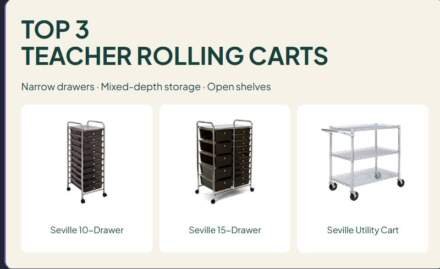
If your prep includes protected resources, compare our laminators for teachers. For organizing finished sets, see our teacher rolling cart comparison.
Teacher paper cutter questions
Which mechanism is best?
Choose around the task and the operator. An arm, sliding carriage, and rotary wheel use different motions and alignment methods. Try the intended workflow when possible; we have not measured one mechanism as more accurate or easier for every teacher.
Can these cut laminated resources?
Confirm that the exact tool supports the material and thickness. Lamination changes the material being cut, so the copy-paper capacity does not answer that question. Follow both the laminating and cutting instructions for the project.
Can I cut cardstock at the maximum sheet count?
Do not assume so. Cardstock varies in thickness, and paper ratings use specified conditions. Check the supported material and batch limit, then use the manufacturer’s instructions.
Which should I shortlist?
Compare the Swingline 9312 for letter-size guillotine work, the Fiskars SureCut Deluxe for visible cut-line positioning, and the original CARL RT-200 for a rotary workflow with identified replacement parts. Then verify the dimensions and material fit against one real project.






Leave a Comment