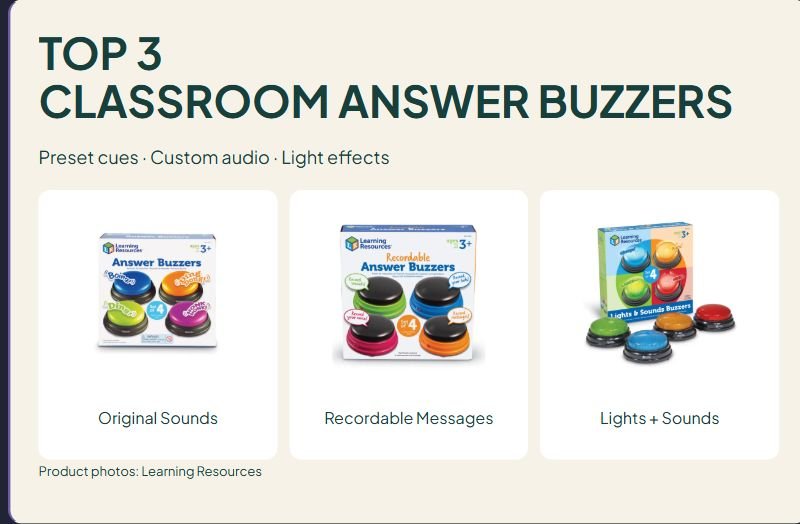

TOP 3
CLASSROOM ANSWER BUZZERS
Preset cues · Custom audio · Light effects

Original Sounds

Recordable Messages

Lights + Sounds
Product photos: Learning Resources
Affiliate disclosure: As an Amazon Associate I earn from qualifying purchases. Purchases through our links may earn a commission at no additional cost to you.
Classroom answer buzzers add a signal to an activity, but the signal needs a purpose. Decide whether you want a team to request a turn, play a short recorded message or trigger a sound-and-light effect. Those are different jobs, and a buzzer that suits a lively review game may be a poor fit for a quiet work period.
This comparison covers three Learning Resources four-buzzer sets: Original Answer Buzzers LER3774, Recordable Answer Buzzers LER3769 and Lights & Sounds Buzzers LER3776. It uses identifiable manufacturer models and product descriptions, not classroom testing or measured learning outcomes. These are activity tools; this guide does not assess them as individualized communication devices or recommend a therapy treatment.
Quick comparison of classroom answer buzzers
| Decision | Original LER3774 | Recordable LER3769 | Lights & Sounds LER3776 |
|---|---|---|---|
| Main format | Four preset sounds | Record a message or sound | Preset sounds plus lights |
| Set size | Four buzzers | Four buzzers | Four buzzers |
| Manufacturer age label | 3+ | 3+ | 3+ |
| Sound examples or limit | Horn, boxing bell, doorbell, boing | Up to seven seconds per recorded response | Siren, game-show tone, laser, charge |
| Listed battery requirement | Two AAA per buzzer | Two AAA per buzzer | Two AAA per buzzer |
| Batteries included | No | No | No |
| Main preparation task | Assign each sound to a team or turn | Record and check each message | Check whether lights and sounds suit the activity |
The source pages describe two AAA batteries per buzzer. Four buzzers therefore require eight AAA batteries in total when all four use that requirement. Confirm the current U.S. package and battery instructions before ordering. The recording and light-up feature descriptions come from the manufacturer's UK pages for these exact model codes; local availability and prices are not transferred to a U.S. offer.
1. Original Answer Buzzers: four distinct preset sounds
LER3774 includes four differently colored buzzers with horn, boxing-bell, doorbell and boing sounds. The manufacturer lists a diameter of about 3.5 inches and ages three and up. This is the four-buzzer Original set, not the separately sold twelve-unit class pack or the recordable version.
Why consider it: Preset sounds avoid a recording step. You can assign a buzzer to each of four teams and explain what a press means before the first question. Keep a visible turn system as well, especially when several teams press at nearly the same time.
Limitation: A sound identifies a pressed buzzer, not whether an answer is correct. We have not verified an electronic lockout, timing display or first-press adjudication system for this set. Do not buy it expecting a centralized quiz controller based only on game-show wording.
Choose it when: You want recognizable preset audio cues for an activity and do not need to create your own recordings.
2. Recordable Answer Buzzers: short custom messages
LER3769 is the four-buzzer recordable set. The manufacturer describes recording a sound, voice or message of up to seven seconds per response. The exact-model instruction sheet describes holding the red side button, waiting for a beep, recording and releasing the button, then pressing the buzzer to play the result. Follow the current included instructions if the controls differ.
Why consider it: A custom recording lets you plan a cue such as a team's name or a short activity instruction. Write the message first, keep it brief and listen to playback before the group starts. Check every unit rather than assuming that recording one buzzer configures all four.
Limitation: Seven seconds is a short response, not unlimited audio storage. This guide has not verified multiple-message memory, adjustable playback volume or any connection to a phone or classroom management system. Do not infer those features from the word recordable.
Choose it when: The activity benefits from a specific recorded cue and you can prepare and check the recordings in advance.
3. Lights & Sounds Buzzers: a combined visual and audio effect
LER3776 is the four-buzzer light-up set. The manufacturer describes lights activating with a press and sounds including a siren, game-show tone, laser and charge effect. The product is distinct from the twelve-unit LER3779 display pack; check the exact model and count in the selected listing.
Why consider it: A visible light adds another observable effect to a press. Decide how students will see the buzzer from their places and what action the cue requests. A quick demonstration can establish the rule before the actual review questions begin.
Limitation: Lights do not establish a silent mode, and the product is explicitly a lights-and-sounds format. We have not verified independent light control, an adjustable brightness setting or a volume control. If you need a quiet signal, confirm that requirement before choosing this model rather than assuming audio can be disabled.
Choose it when: Both effects fit the planned activity and the people using the room. A more noticeable effect is not automatically a better response system.
Plan the activity before buying the buzzer
Set one clear meaning for a press
For example, a press might mean that a team is ready to explain an answer. Explain whether participants should wait for a signal before pressing and what happens after a press. Avoid changing the meaning halfway through a game without teaching the new rule.
Keep thinking time separate from reaction time
Give the question, allow time to think and discuss, then invite the response signal. If every round rewards the fastest press, the activity may tell you more about speed than the explanation students can give. Ask for the reasoning after the signal; a buzzer sound is not evidence of understanding.
Offer another way to take a turn
Plan a visible card, a spoken request or another appropriate response option alongside the game. Check how the sound and lights affect the actual group rather than relying on general marketing claims about participation. The tools should support the activity's purpose, not become a requirement for being heard.
Budget for batteries and setup
List the batteries and any required tool with the purchase. The LER3769 instruction sheet specifies adult battery installation and a Phillips screwdriver that is not included. Follow each model's current battery and care directions. Do not mix the retail set size with the battery count per unit when estimating the full supply requirement.
Questions before ordering
Do these buzzers identify the first person electronically?
This guide has not verified a shared lockout controller or timing display. Treat the described sets as individual signal buttons unless the exact listing and manual establish additional features. Use a clear turn rule for close or simultaneous presses.
Are recordable buzzers automatically the best choice?
Only if you have a reason to use a recording. Preset sounds require less content preparation, while recordable units require a message and playback check. Choose the feature for the activity instead of assuming more customization is always necessary.
Where are the customer ratings and reviews?
No customer excerpts are included because none has been verified and authorized for these exact models. We do not invent star ratings, classroom tests, learning benefits or durability results. The comparison separates listed features from practical planning suggestions.
For a separate tool that shows how long an activity has left, see our visual timer comparison. A response buzzer and a countdown timer serve different purposes.
Manufacturer specifications and photo sources
LER3769 manufacturer recording and battery instructions (PDF)




Leave a Comment