

A classroom jobs chart turns everyday tasks into real responsibilities that students own. Picture a second-grade room at 8:15. Someone needs to hand out folders, someone needs to change the calendar, and the plants have not been watered all week. When the teacher does every task alone, the morning feels rushed. When students share the work, the room starts to run itself.
This guide walks you through five steps: choose the jobs, set up the chart, teach each job, plan a fair rotation, and review how it is going. You will also see how a visual chart supports readers and non-readers, including students with disabilities. By the end, you will have a system you can launch on a Monday morning.
Examples are fictional. Adapt to the student’s goals and agreed supports. This is guidance, not a diagnosis.
At a glance
- Classroom jobs build responsibility, independence, and a sense of belonging.
- Choose jobs that match real needs in your room and your students’ skills.
- A visual chart with pictures helps readers and non-readers alike.
- Teach each job step by step before students do it alone.
- Rotate jobs fairly and review the system every few weeks.
1. Choose jobs for your classroom jobs chart
First, list the tasks that happen every day or week in your room. Look for jobs that are real, useful, and safe for students to do. A classroom jobs chart works best when every job matters, so students can see the result of their work.
Common examples include line leader, door holder, materials manager, classroom cleaner, technology helper, library helper, calendar helper, lunch helper, line caboose, messenger, plant or class pet caretaker, and kindness ambassador. You do not need all of them. Pick the ones that fit your schedule and space.
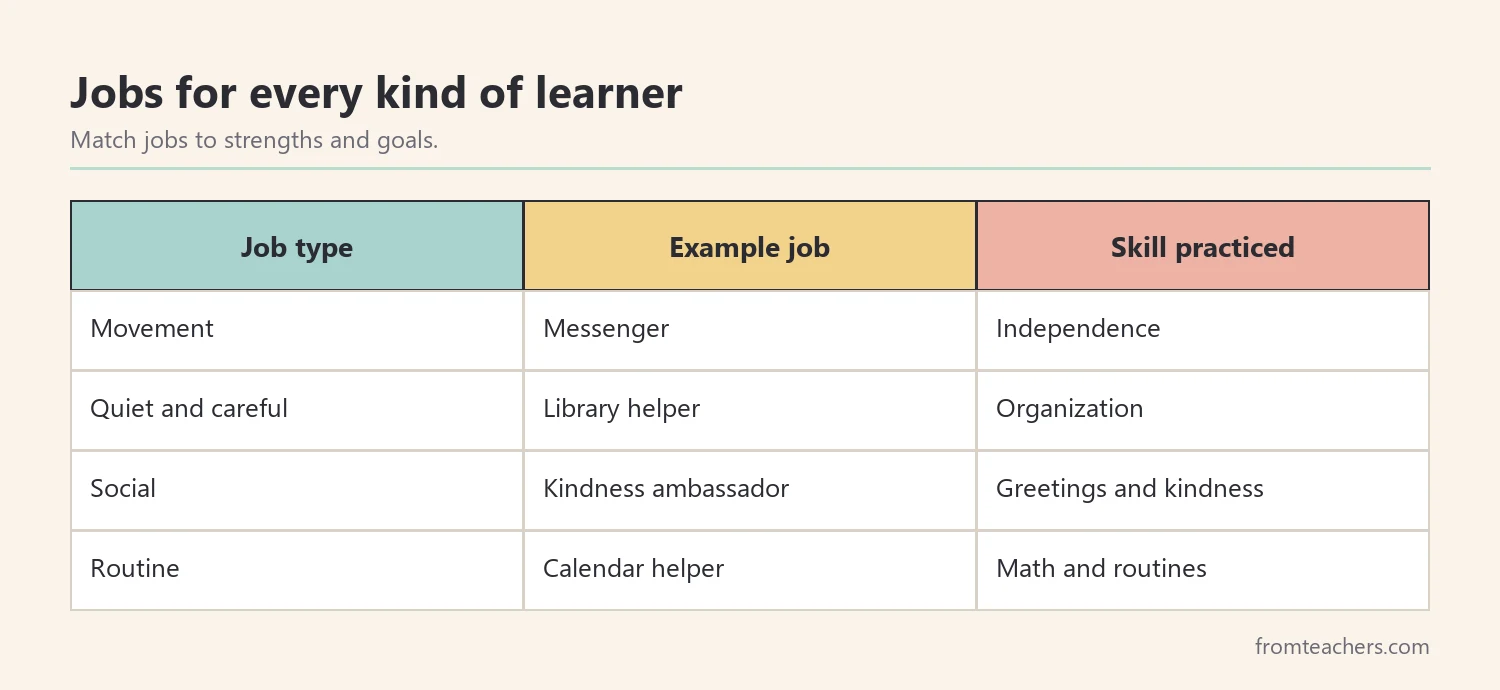
Meet our fictional class: Ms. Rivera’s second grade, with 24 students. Ms. Rivera listed her daily tasks and matched them to 12 jobs. She noticed that several jobs, such as messenger and door holder, were ideal for students who need movement breaks. Others, like library helper, suited students who enjoy quiet, careful work.
| Job | What the student does | Skill practiced |
|---|---|---|
| Materials manager | Hands out and collects supplies | Organization |
| Calendar helper | Changes the date at morning meeting | Math and routines |
| Messenger | Takes notes to the office | Independence |
| Kindness ambassador | Welcomes new students and visitors | Social skills |
Also, think about individual goals. A job can give a student real practice with a skill on their plan. For example, a student working on following multi-step directions might be a materials manager, while a student working on greetings might be a kindness ambassador. Talk with the student’s team about which jobs fit.
Finally, keep jobs short and clear. Each job should take only a few minutes and have an obvious finish. Long or vague jobs lead to confusion and arguments.
In addition, check that each job is safe and reachable. Plants should sit on a low shelf, supplies should live in labeled bins students can reach, and messenger trips should follow your school’s rules for students in hallways. A quick walk around the room with a student’s eye view often shows small changes that make jobs possible.
2. Set up a visual classroom jobs chart
Next, make the chart easy to read for everyone. A visual classroom jobs chart pairs each job with a picture and a short description. Pictures help students who are learning to read, English learners, and students who use visual supports.
- Place the chart at student eye level near the door or meeting area.
- Use one picture and a short description for each job.
- Add name cards, clips, or photos that move easily between jobs.
- Keep a spot for students who are “on break” this week.
- Use large, clear fonts and simple colors.
Ms. Rivera used a poster with 12 illustrated jobs and added a clothespin with each student’s name. She also took a photo of each student, so non-readers could find themselves quickly. Within a day, students were checking the chart on their own each morning.
Also, think about where materials for each job live. The calendar helper needs the date cards nearby, and the materials manager needs supplies in labeled bins. When everything a job needs sits close to the classroom jobs chart or the job location, students spend their time doing the job instead of searching.
If you want a ready-made option, the classroom jobs chart poster shows 12 illustrated student jobs, each with a short description of what the job involves.
3. Teach each job step by step
Then, teach the jobs directly. Many problems with classroom jobs come from students not knowing exactly what to do. Model each job, practice it together, and give feedback before students work alone.
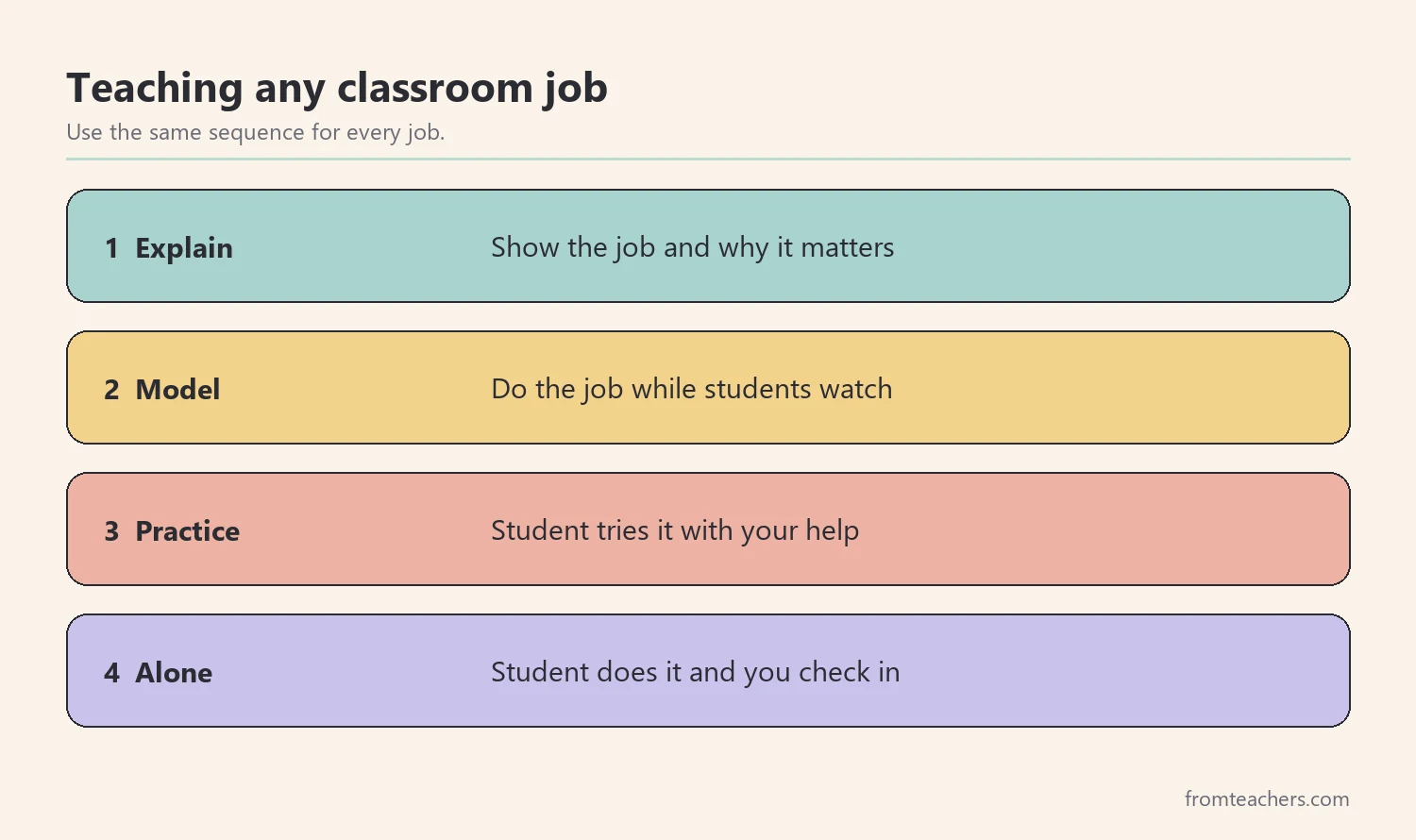
A simple teaching sequence works well. First, show the job and explain why it matters. Next, model it while students watch. Then, let a student try it with your help. Finally, let the student do it alone and check in afterward.
For students who need extra support, create a small job card with picture steps. For example, the plant caretaker card might show three pictures: fill the cup halfway, water each plant, return the cup. Job cards help students work independently and reduce the need for adult reminders.
Role-play helps too. Act out a job done well and a job done in a rush, and let students spot the difference. Students enjoy being the judges, and they remember the steps better after seeing both versions.
Ms. Rivera taught two or three jobs per day during the first week. By Friday, every job had been modeled and practiced. She kept job cards in a small basket next to the classroom jobs chart, so students could check the steps anytime.
In addition, teach what to do when a job holder is absent. A simple rule, such as “the student on break fills in,” prevents confusion and keeps the routine moving.
Finally, give clear feedback in the first weeks. Notice what went well and name one thing to improve: “You handed out every folder. Next time, start with the front table.” Short, specific feedback helps students master the job quickly and feel proud of their work.
4. Plan a fair rotation for the classroom jobs chart
Fairness matters to students. If the same students always get the favorite jobs, others lose interest. Plan a rotation that gives everyone a turn at different jobs over time.
Avoid choosing jobs by popularity or by who asks first. Those methods feel exciting at first but quickly lead to hurt feelings. A posted rotation removes the guesswork, because students can see exactly when their turn is coming. Students who know their favorite job will come around again are far more patient when it belongs to someone else this week.
Decide whether jobs change daily or weekly. Weekly changes give students time to learn and improve. Daily changes can work for younger students or very short jobs. Choose one and stick with it so the routine stays predictable.
In Ms. Rivera’s class, 24 students share 12 jobs. Each week, 12 students have a job and 12 are on break. The next week, the groups swap. In this way, every student has a job every other week, and over the year, each student tries many different roles.
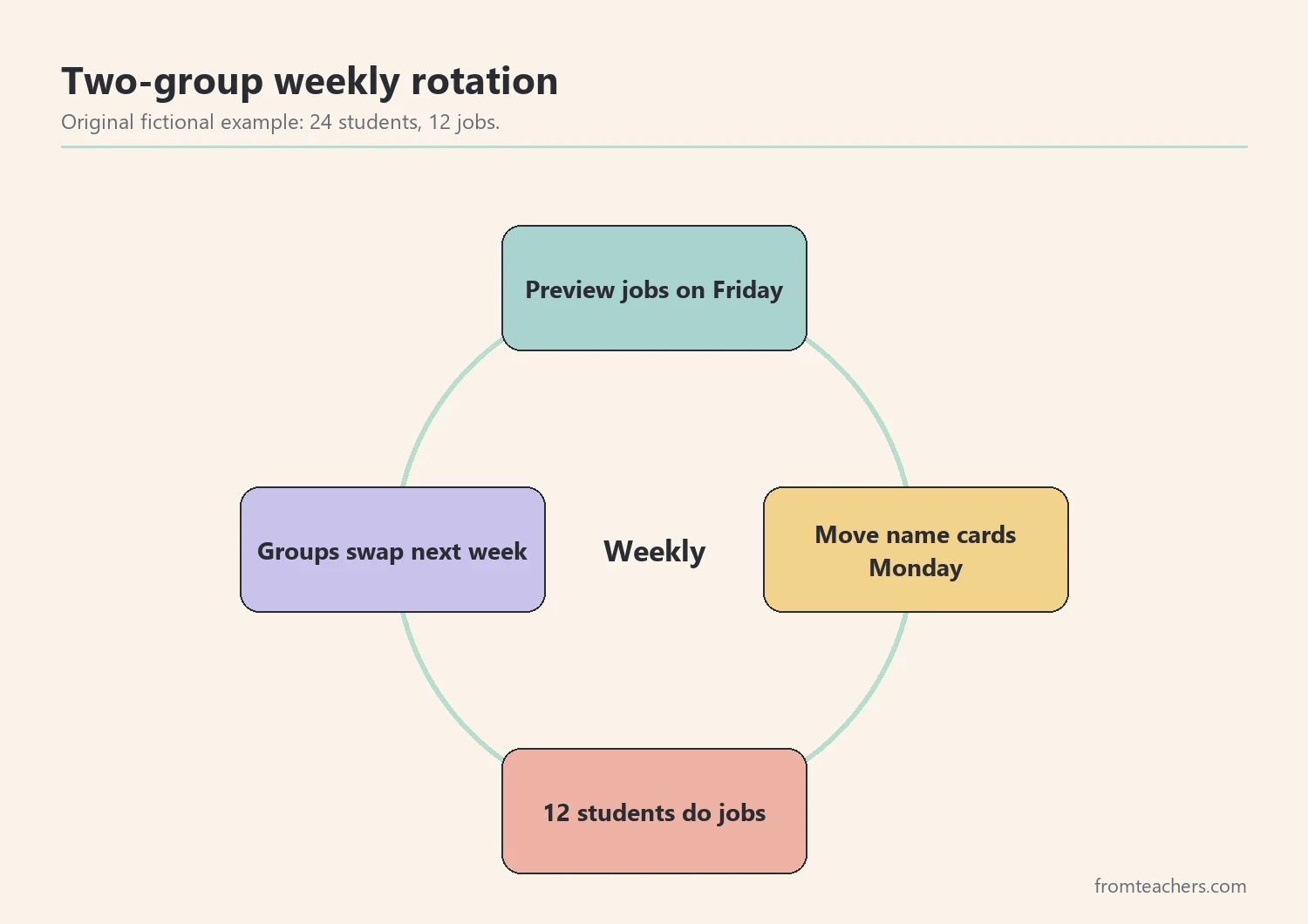
Also, make the change predictable. Move the name cards at the same time every week, such as Monday morning. Announce the new jobs at morning meeting and let students read their job aloud or point to the picture.
For students who struggle with change, preview their new job on Friday. A quick look at the job card before the weekend makes Monday easier.
Some teachers also pair new job holders with a student who did the job the week before. The outgoing student shows the steps once, then hands over. This peer handover builds leadership, and it means the classroom jobs chart keeps running even when the teacher is busy or a substitute is in charge.
5. Review the system and celebrate effort
Finally, check how the system is working. Every few weeks, ask simple questions: Are jobs getting done? Are any jobs confusing? Do students seem proud of their roles? Use short notes, not complex data.
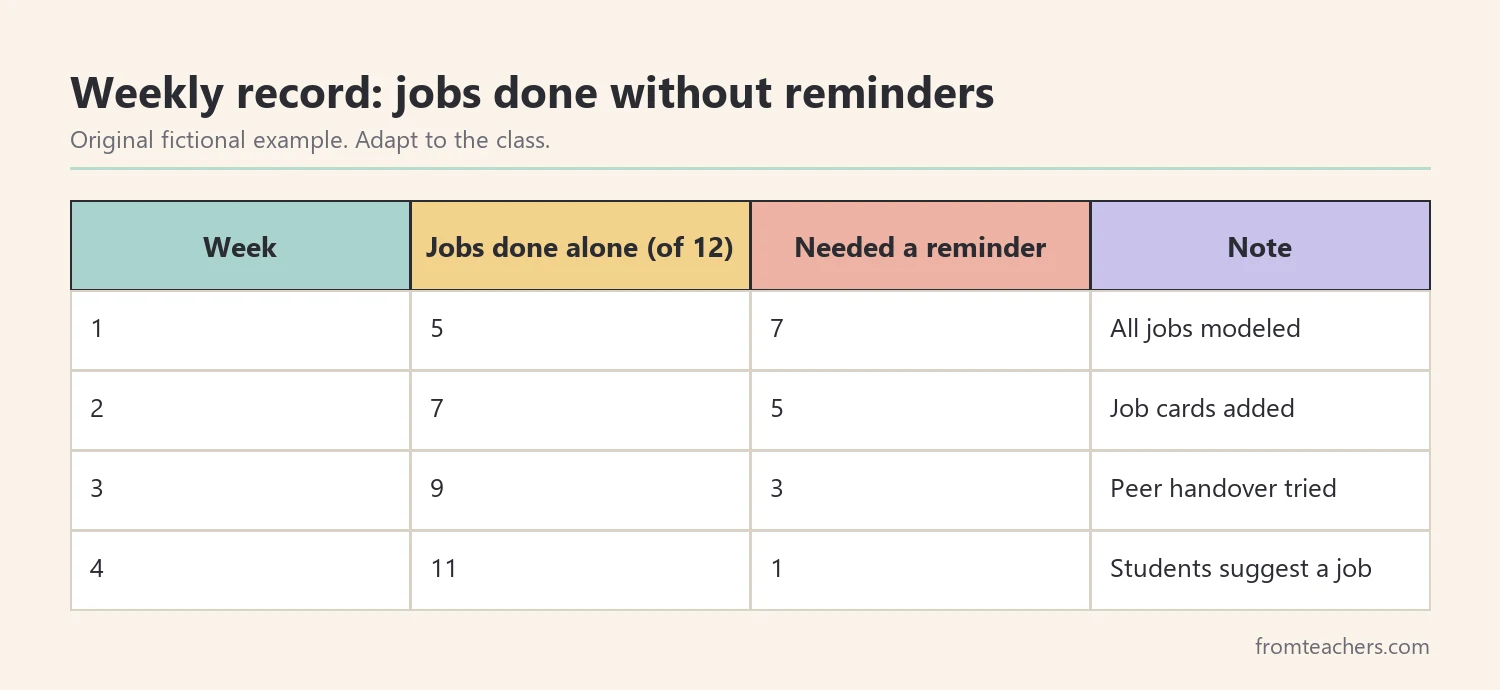
Ms. Rivera tracked how many of the 12 jobs were done each week without a reminder. In the first week, students needed many prompts. By the fourth week, most jobs ran on their own. She also noticed that the messenger and door holder jobs helped two students who often needed movement.
Look beyond the numbers too. Notice which students seem calmer, more confident, or more connected since they started their jobs. For some students, a job is the first time they have been trusted with a real responsibility at school, and that change can be the most important result of all. Write down these moments and share them with families and the student’s team.
Celebrate effort, not perfection. Thank students for their work, mention specific actions, and occasionally share a class “job well done” moment. In addition, invite students to suggest new jobs or improvements. Students who help shape the classroom jobs chart feel more ownership.
Also, share the system with families. A quick note about each child’s job gives families something positive to talk about at home. Some families even create matching home jobs, such as setting the table or feeding a pet.
When something is not working, change one thing at a time. If the lunch helper job keeps causing delays, adjust that job’s steps before changing the whole system. Small fixes keep the routine stable, which matters for students who rely on predictability.
Over the year, you can grow the system. Add a new job when a real need appears, retire jobs no one needs, and let experienced students train newer ones. A classroom jobs chart that changes with your class stays useful from the first week of school to the last.
Common mistakes and how to avoid them
- Creating jobs that are not real. Choose tasks that truly help the classroom.
- Skipping instruction. Model and practice each job before students do it alone.
- Unfair rotation. Use a clear, predictable system so everyone gets turns.
- Text-only charts. Add pictures so every student can read the chart.
- Using jobs as rewards or punishments. Keep jobs as shared responsibilities for all.
Questions teachers and parents ask about the classroom jobs chart
How many jobs should a classroom have?
It depends on class size and daily tasks. Many teachers use about one job for every two students and rotate weekly, so everyone has a job regularly without too many roles to manage.
Should jobs change daily or weekly?
Weekly changes give students time to learn the job well. Daily changes can work for younger students or very short jobs. Choose one schedule and keep it consistent.
How can students with disabilities take part?
Use picture-based job cards, break jobs into small steps, and match jobs to each student’s strengths and goals. Talk with the student’s team about any extra supports.
What if a student does not want a job?
Find out why. The job may be confusing, too hard, or uncomfortable. Offer a different job, a partner, or a job card with clear steps.
Can a classroom jobs chart work in older grades?
Yes. Older students can take on more complex roles, such as technology helper or peer tutor. Adjust the chart design and job descriptions to their age.
Related reading: Moving Beyond Shame and Behavior Charts: Positive Alternatives for Effective Classroom Management, Building Workplace Readiness: Essential Skills for Career Success, and Bridging Gaps in Special Education: Practical Strategies for Teachers.
A companion resource for classroom jobs chart:
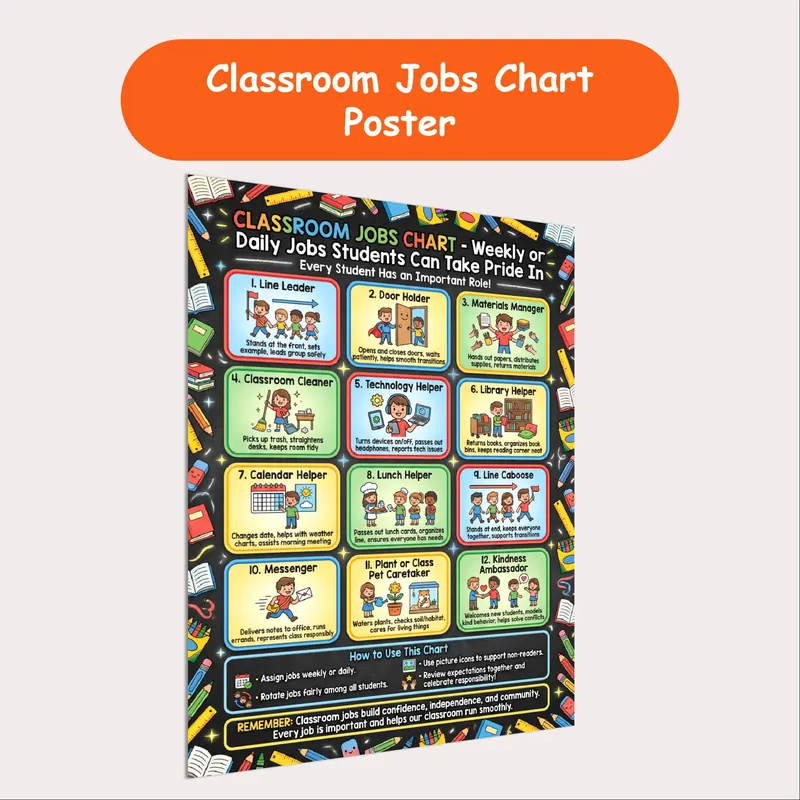
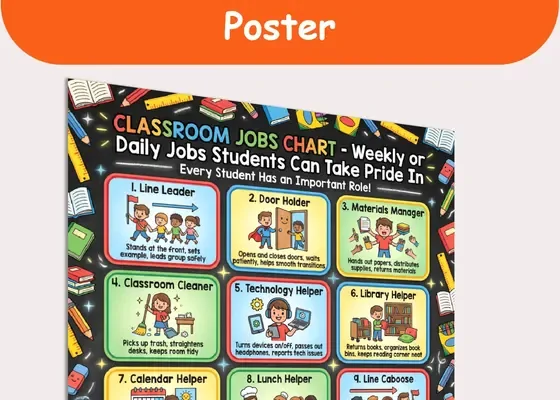
Classroom Jobs Chart Poster | 12 Student Jobs for Daily or Weekly Roles: a printable poster with 12 illustrated student jobs, each with a short description, that gives every student an important role and makes classroom responsibilities visual for readers and non-readers alike.
Sources and scope
- CASEL: a leading organization for social and emotional learning, including responsible decision-making.
- Center on PBIS: resources on positive classroom routines and expectations.
- IRIS Center, Vanderbilt University: free modules on classroom management and routines.
- CAST: the Universal Design for Learning framework, including visual ways to present information.
This guide covers setting up and running classroom jobs for elementary students, including students who benefit from visual supports. It does not cover individual behavior plans, which belong to the student’s team.
Key takeaways
- A classroom jobs chart gives every student a real, useful role.
- Use pictures and short descriptions so readers and non-readers can use it.
- Teach each job step by step before students work alone.
- Rotate jobs fairly on a predictable schedule.
- Review the system, celebrate effort, and share jobs with families.






Leave a Comment