

Working memory vs processing speed is a question many teachers face without naming it. A fourth grader sits with a half-finished math page while classmates line up for recess. Is she forgetting the steps halfway through, or is she following every step correctly but slowly? From the back of the room, both look the same: unfinished work and a frustrated child.
This guide helps you tell the difference and respond in the right way. You will learn what each skill does, how to observe the student with a few simple checks, how to support working memory, how to support processing speed, and how to review the plan with the team. By the end, you will have a short if-then plan you can test in your own classroom.
Examples are fictional. Adapt to the student’s goals and agreed supports. This is guidance, not a diagnosis.
At a glance
- Working memory holds and uses information for a short time; processing speed is how quickly a person takes in and completes simple tasks.
- Both can lead to unfinished work, but the causes and fixes differ.
- Simple classroom checks can point to the likely bottleneck.
- Working memory supports reduce what the student must hold in mind.
- Processing speed supports reduce time pressure and the amount of work.
1. Understand working memory vs processing speed
First, a quick definition of each skill. Working memory is the ability to hold information in mind and use it for a short time, such as remembering a three-step direction while doing step one. Processing speed is how quickly a person can take in information, make simple decisions, and respond, such as copying words or solving easy math facts.
Both skills affect almost every lesson. However, they fail in different ways. When working memory is overloaded, the student loses track of steps, forgets directions, or makes errors in the middle of multi-step tasks. When processing speed is slow, the student usually gets the steps right but needs much more time to finish.
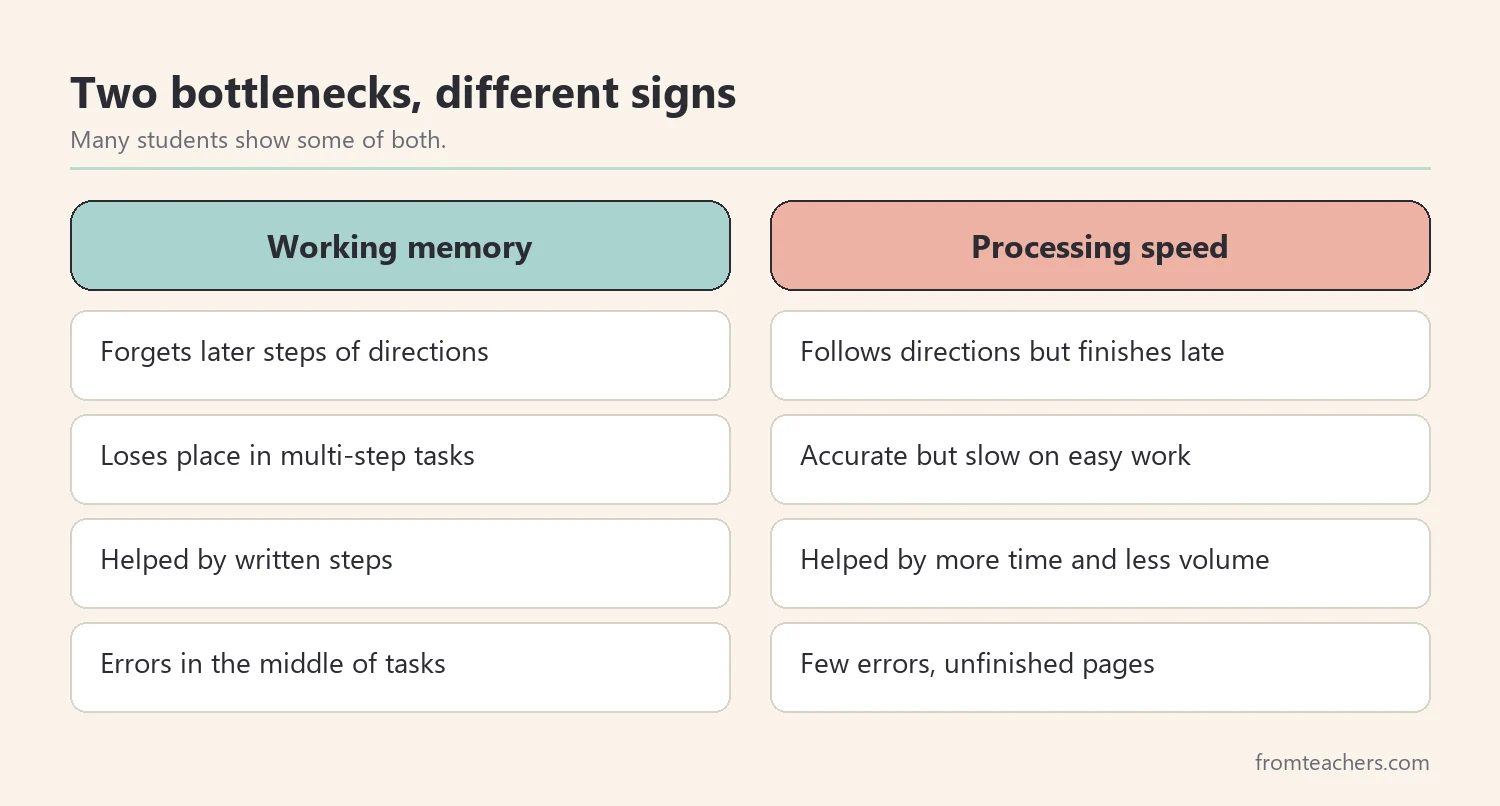
Understanding working memory vs processing speed matters because the supports are almost opposite. A student with working memory difficulties needs information made visible and broken into steps. A student with slow processing speed needs more time and less volume. Giving extra time to a student who forgets the steps rarely helps, and breaking a task into tiny steps can slow down a student who already knows what to do.
Keep in mind that many students have difficulties with both. Formal measurement of these skills belongs to qualified professionals, such as school psychologists. Your classroom observations, however, are valuable information for the team and help you choose daily supports right away.
Also, remember that other factors can look similar. Anxiety, tiredness, hearing or vision problems, and gaps in earlier skills can all slow a student down or cause lost steps. Thinking about working memory vs processing speed is a useful starting point, but it is not the only lens. Keep an open mind and share what you see with the family and the team.
2. Check working memory vs processing speed in class
Next, gather clues. You do not need formal tests to start. A few short checks during normal lessons can show you where the student gets stuck. Think of it as working memory vs processing speed detective work.
Meet our fictional student, Ava, a fourth grader. Ava is friendly and works hard. However, she rarely finishes math and writing tasks. Her teacher tried four checks over two weeks.
| Check | What Ava did | Points toward |
|---|---|---|
| Gave a three-step direction aloud | Did step one, then asked what was next | Working memory |
| Wrote the same directions on her desk | Followed all three steps | Working memory |
| Timed a page of easy math facts | Accurate, average speed | Not processing speed |
| Multi-step word problems | Lost her place midway | Working memory |
As a result, the pattern pointed mainly to working memory. Ava could work at a typical pace when the steps were visible. She struggled when she had to hold several pieces of information in her head at once.
Now compare a second fictional student, Ben, in the same class. Ben followed spoken directions well and rarely made errors. However, he finished only half of every timed fact page, even when the facts were easy for him. For Ben, the working memory vs processing speed picture looked very different: his bottleneck was speed, not memory.
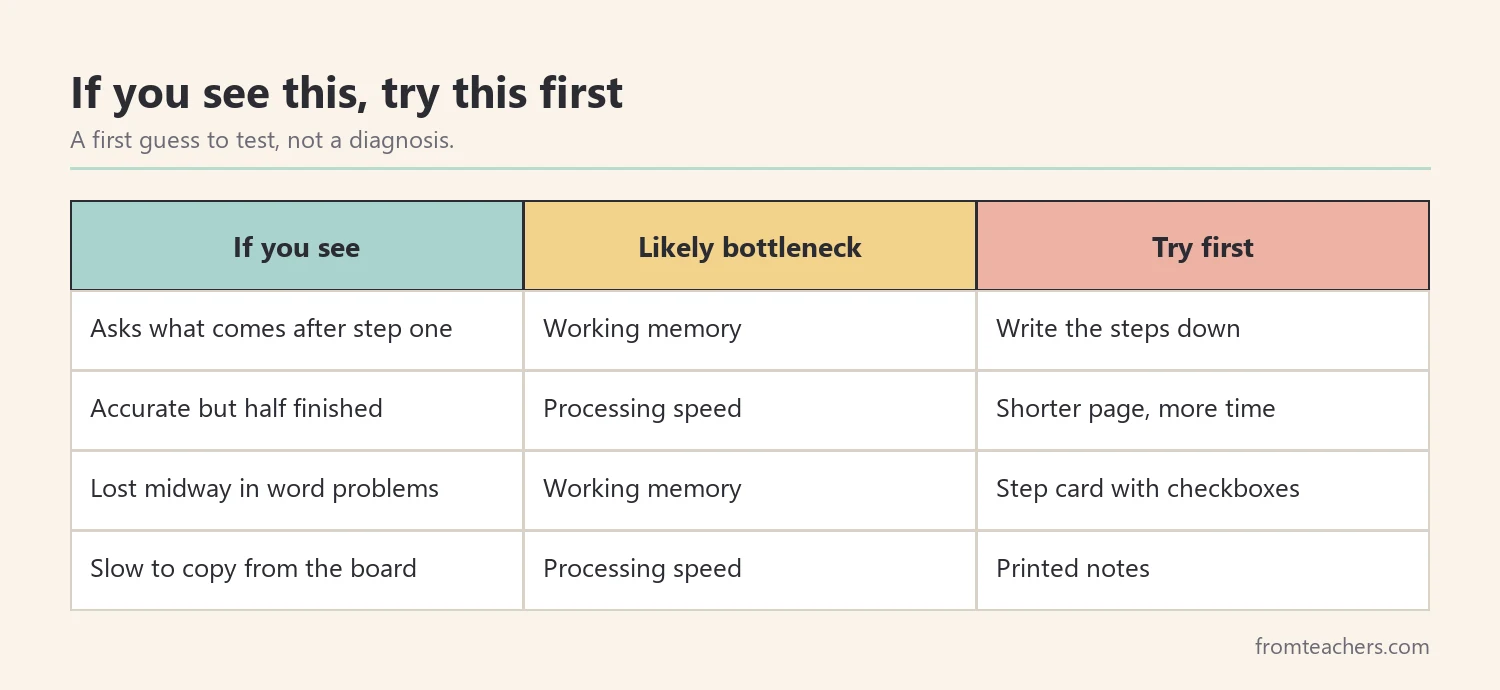
Also, look at how the student responds to support. If writing directions down solves the problem, working memory is a likely factor. If extra time solves it, processing speed is more likely. Responses to support are some of your best clues.
Quick checks you can try this week
- Give a direction aloud, then give the same direction in writing, and compare.
- Time a short page of easy, familiar work to see the student’s pace.
- Ask the student to repeat a direction back before starting.
- Watch where errors appear: at the start, in the middle, or not at all.
Keep each check short and low-stakes. The goal is to compare working memory vs processing speed under normal class conditions, not to test the student. If you want ready-made if-then tools for this step, the working memory and processing speed strategy tables help you identify the bottleneck and respond in the right way.
3. Support working memory in daily lessons
Then, if working memory is the main issue, reduce the amount the student has to hold in mind. The goal is not to make work easier in content, but to move information from the head onto paper, the board, or a tool.
- Give directions one step at a time, or write them down.
- Post step-by-step checklists for common routines.
- Provide worked examples the student can look at while working.
- Use graphic organizers to hold ideas during writing.
- Teach the student to check off steps as they finish them.
- Repeat key information and ask the student to say it back.
For Ava, her teacher put a small step card on her desk for multi-step math problems. Each card listed the steps with a box to check. Ava also got a worked example at the top of each page. Within two weeks, she was finishing more problems correctly, because she no longer had to remember where she was.
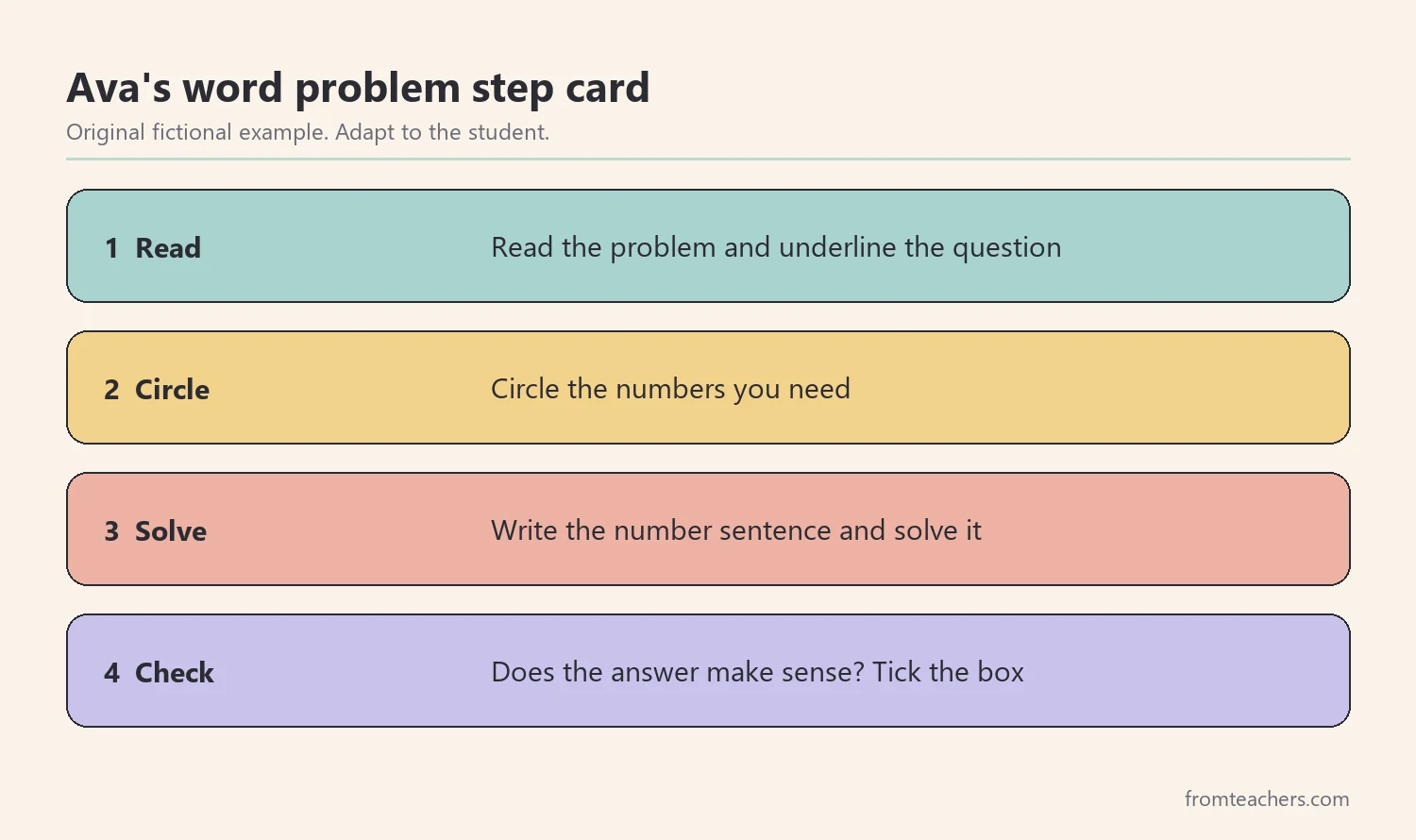
In addition, teach memory strategies directly. Students can learn to repeat directions quietly, picture each step, or write a quick note. These habits move some of the load off working memory and build independence over time.
Finally, watch the language load. Long sentences, extra details, and several questions at once all compete for working memory. Short, clear directions in the order the student will use them help every learner, not only those with documented needs.
4. Support processing speed when it is the bottleneck
If processing speed is the main issue, the student usually understands what to do but needs more time. The goal is to reduce time pressure and the amount of repetitive work while keeping the key learning in place. Seeing working memory vs processing speed clearly prevents you from adding supports the student does not need.
- Shorten assignments while keeping the most important items.
- Allow extra time on tests and timed tasks, if agreed by the team.
- Reduce copying by giving printed notes or partly filled pages.
- Give advance notice of questions in discussions.
- Grade for accuracy and understanding rather than speed.
For Ben, his teacher cut the number of practice problems in half, choosing the ones that covered each skill. She also gave him printed notes instead of asking him to copy from the board. As a result, Ben finished his work and had time to check it.
Tests need special thought. A student with slow processing speed may know every answer yet leave half the test blank. Fewer questions per page, a clear layout, and agreed extra time let the test measure what the student knows rather than how fast they write. Discuss these changes with the team before test day, so the student is not surprised.
Also, avoid rushing the student. Saying “hurry up” adds stress and often slows the student further. Instead, plan the time and the amount of work so the student can succeed at their own pace.
Fluency practice can also help over time. Short, regular practice with familiar facts or sight words may help some students work more automatically. Keep it brief and positive, and track accuracy as well as speed. When you compare working memory vs processing speed results over a term, fluency gains often show up as more finished work, even before the student feels faster.
5. Review working memory vs processing speed supports
Finally, measure and share. Choose one or two simple measures for each student, such as problems finished correctly or tasks completed within the class period. Review the numbers every three to four weeks.
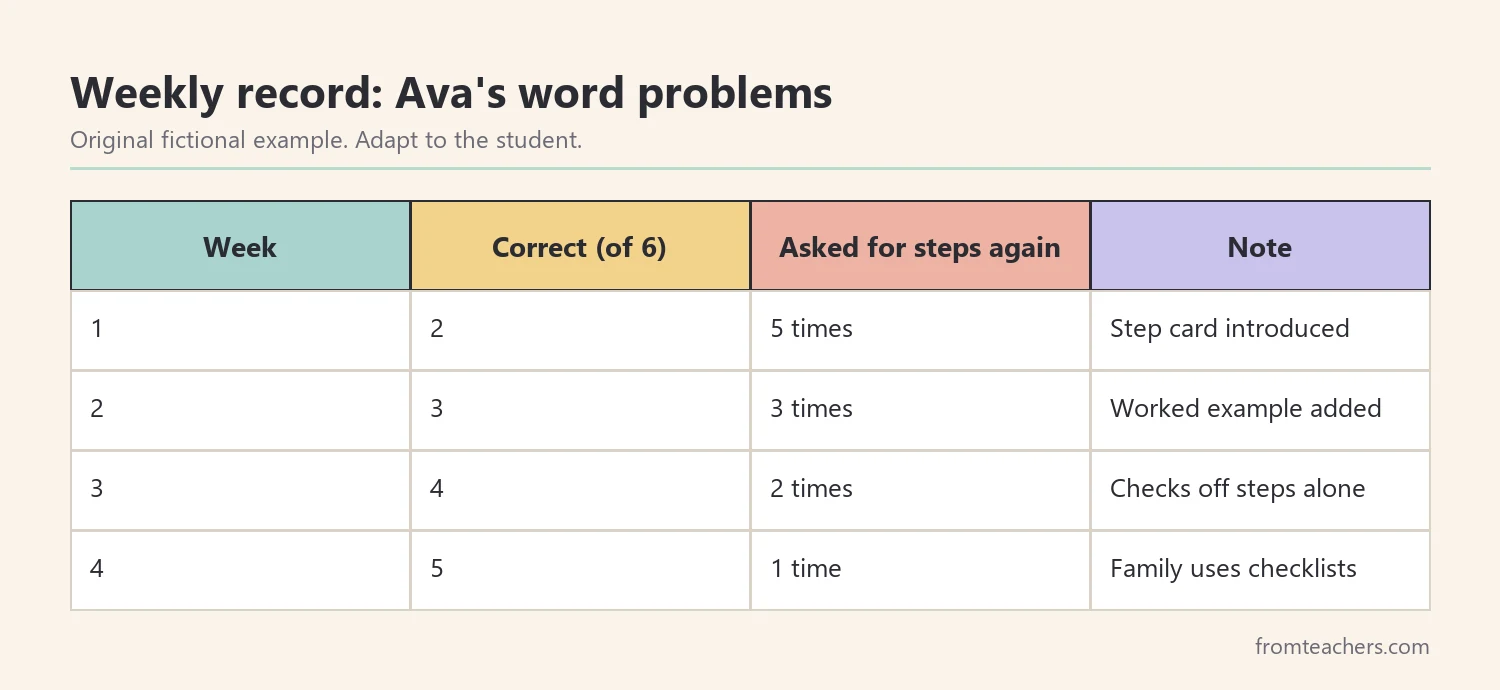
Share your observations with the student’s team, including the school psychologist if the student is being evaluated. Your notes about working memory vs processing speed in the classroom help professionals interpret formal results. In turn, their findings can confirm or adjust your supports.
Include the family as well. Ask whether they see similar patterns at home, such as forgetting multi-step chores or needing much longer for homework. Shared observations make the plan stronger. Also, include the student. Ask which supports help most, and teach them to ask for those supports on their own.
Ben’s record looked different: the team tracked how many practice pages he finished within the class period. Different students need different measures, chosen to match their bottleneck.
Change one thing at a time so you can see what works. When a support becomes a habit, keep it and add the next one if needed.
In addition, write a short summary for the student’s file. For example: “Ava: written steps and a step card help most; pace is typical when steps are visible.” A summary like this tells next year’s teacher exactly where to start, and it keeps the working memory vs processing speed question from being solved again from scratch.
Common mistakes and how to avoid them
- Assuming every slow student needs extra time. Check first whether the student is losing track of steps.
- Breaking every task into tiny steps. This can slow down a student whose main issue is speed.
- Repeating spoken directions louder. Write them down instead.
- Cutting key content. Shorten repetitive practice, not the core skill.
- Working alone. Share observations with the team and family.
Questions teachers and parents ask about working memory vs processing speed
Can a student have difficulty with both?
Yes. Many students have challenges with both skills. In that case, combine supports carefully, such as written steps plus a shorter assignment, and watch which change helps most.
Who measures working memory and processing speed?
School psychologists and other qualified professionals use standardized assessments to measure these skills. Classroom observations add valuable context to their results.
Are these skills linked to ADHD or learning disabilities?
Difficulties with working memory and processing speed are often discussed alongside ADHD and learning disabilities. However, only a qualified evaluation can explain a specific student’s profile.
What can parents do at home?
Parents can give one direction at a time, use checklists for routines, and allow enough time for homework. Noticing what helps at home is useful information for the school team.
Can these supports go into an IEP or 504 plan?
Yes, supports such as written directions, extra time, or reduced copying are often included. Talk with the student’s team about what fits their plan.
Related reading: Accommodations vs Modifications in Special Education: The Difference Explained, The Power of Data Tracking in Special Education, and Effective ADHD Classroom Strategies to Support Student Success.
A companion resource for working memory vs processing speed:
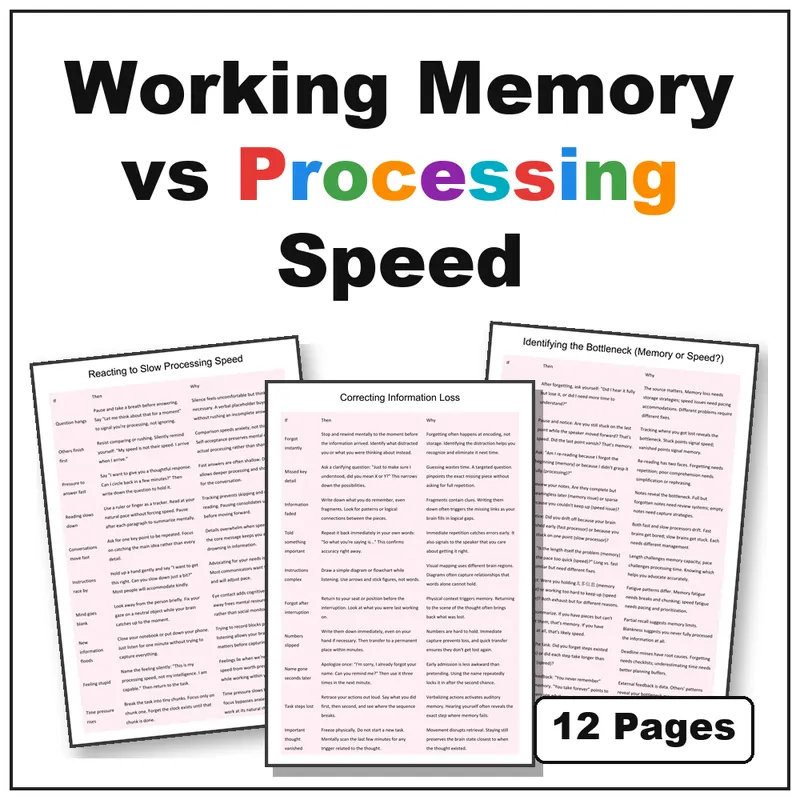
Working Memory vs Processing Speed | Strategies to Identify and Support: 12 printable if-then strategy tables that help you identify whether working memory or processing speed is the bottleneck and respond in the right way.
Sources and scope
- Center on the Developing Child, Harvard University: background on executive function, including working memory.
- Understood.org: practical articles for families and teachers on working memory and processing speed.
- National Association of School Psychologists: information about school psychologists and their role in evaluation and support.
- IRIS Center, Vanderbilt University: free modules on accommodations and evidence-based instruction.
This guide covers everyday classroom and home strategies for students who struggle with holding information or working quickly. It does not cover formal assessment or diagnosis, which belong to qualified professionals and the student’s team.
Key takeaways
- Working memory holds information for use; processing speed is how fast simple work gets done.
- Use simple classroom checks to tell working memory vs processing speed apart.
- For working memory, make steps visible and reduce what the student must hold in mind.
- For processing speed, reduce time pressure and repetitive volume.
- Review the plan with the team, the family, and the student.









Leave a Comment