
TOP 3
ADAPTIVE CLASSROOM SCISSORS
Squeeze loops · Compact tabletop · Mounted base

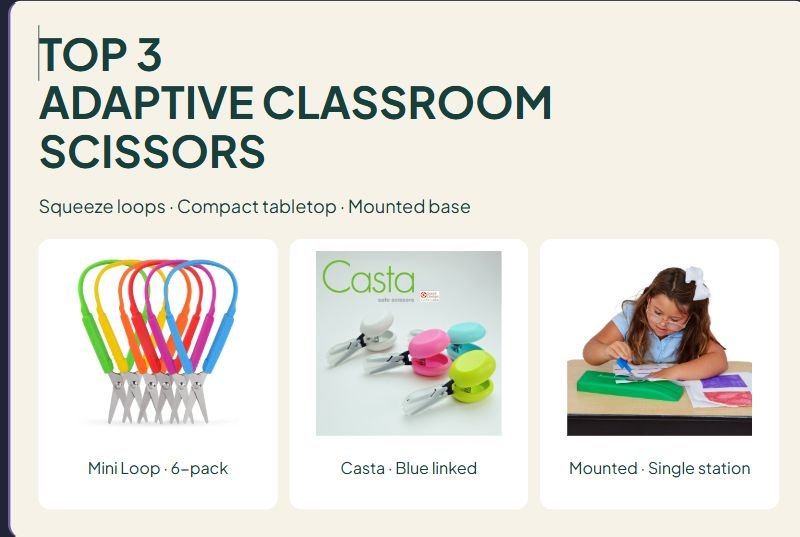
Mini Loop · 6-pack
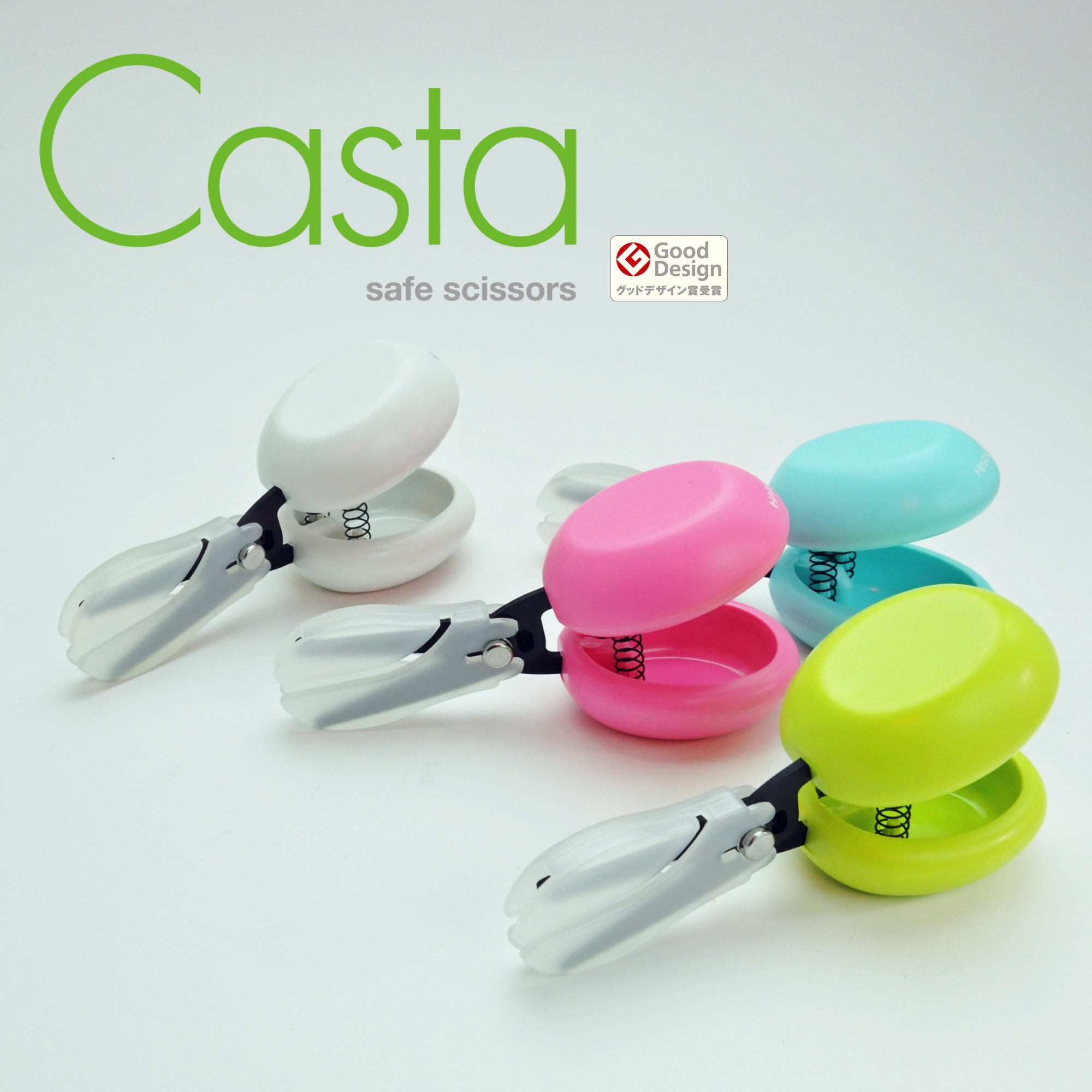
Casta · Blue linked

Mounted · Single station
Affiliate disclosure: As an Amazon Associate I earn from qualifying purchases. Purchases through our links may earn a commission at no additional cost to you.
Adaptive classroom scissors change how a user holds, opens, or supports the cutting tool. A handheld squeeze loop, a compact tabletop handle, and a long fixed base offer different ways to manage paper cutting. Start with the task and the learner’s support plan before choosing a class set.
This comparison covers Special Supplies Mini Loop scissors, HARAC Casta, and Fun & Function’s mounted plastic-base scissors. We checked the US product listings against brand information. We have not tested cutting performance, spring resistance, comfort, or suitability for an individual student.
Three adaptive classroom scissors at a glance
| Product | Package and design | Main advantage | Main limitation |
|---|---|---|---|
| Special Supplies Mini Loop | Six 5.5-inch handheld squeeze scissors | Separate tools for a small group | Paper and tool still need coordinating |
| HARAC Casta | One compact spring-loaded tool; blue linked | Can work on a tabletop with downward pressure | No long paper-supporting base |
| Fun & Function SC4545 | One pair on a plastic base | Paper can move along the supported cutting station | Needs dedicated table space |
1. Special Supplies Mini Loop: a handheld six-pack
The MiniLoop6 listing is the six-pack of 5.5-inch scissors. The brand identifies its matching pack as SKU 1390 and describes six loop colors. Squeezing closes the blades; releasing pressure lets them reopen. The 5.5-inch measurement is overall scissor length, not blade length.
Advantage: A six-pack can supply several workstations or keep individual tools assigned to users. The large loop changes the finger-placement demand compared with conventional two-hole scissors.
Limitation and fit check: A self-opening mechanism does not guide the cutting line or manage the paper. Check handle comfort, closing effort, and the actual material. The brand describes support for either hand; that does not establish equal precision for every left- and right-handed task.
Brand product details and photo source
Check Mini Loop six-pack on Amazon.com →
2. HARAC Casta: a compact tabletop option
Casta has a broad handle, spring-assisted reopening, and a removable cap with a cutting slit. Hasegawa Cutlery describes using its flat-topped handle on a table with downward pressure from an arm or elbow. The linked US version is blue D-CASTA-BU; the manufacturer photograph shows several colors.
Advantage: The compact body offers a tabletop way to operate scissors without conventional finger holes. The cap lets the intended paper path reach the blades through a slit.
Limitation and fit check: It is not a long fixed-base cutting station. Check that the working arrangement stays controlled while the paper moves. The maker directs adults to supervise young children with the safety cap attached; never put fingers into its opening. Dimensions differ between the maker’s regional pages, so confirm the current package if precise clearance matters.
Brand product details and photo source
Check HARAC Casta blue on Amazon.com →
3. Fun & Function mounted scissors: a supported cutting station
The SC4545 mounts scissors on a plastic tabletop base. Downward pressure on a T-shaped handle closes them, and a hidden spring reopens them. The brand lists age four and up with adult supervision. Its dimensions are 11.81 inches long, 3.346 inches wide, and 2.36 inches high.
Advantage: The base provides a route for moving paper toward the cutting action while the scissors stay in a working position. This is a different layout from carrying handheld scissors along a line.
Limitation and fit check: Reserve enough table area for both the base and the sheet. Check stability on the actual surface, the user’s reach, and how the paper will be fed. Do not infer blade material from the Amazon summary field: it says plastic, while the brand’s product photographs show the cutting assembly. Confirm details with the supplier when material specifications are essential.
Brand product details and photo source
Check Fun & Function mounted scissors on Amazon.com →
Choose around one real classroom task
Identify which part needs support
Opening the scissors, closing them, positioning fingers, controlling the cutting line, and managing the paper are different tasks. Describe the difficulty before choosing a design. If equipment is part of an individualized plan, coordinate with the staff or occupational therapist supporting that learner.
Match the material
Check the product instructions for the material to be cut. A tool described for paper cutting is not automatically suitable for thick card, fabric, laminated sheets, or mixed craft materials. Start with the intended task instead of interpreting an adaptive handle as a heavy-duty cutting specification.
Check orientation and version
Write down the model number, blade shape, hand orientation, and opening mechanism. “Long loop,” “mini,” and “self-opening” describe different features. Compare listings against those details, not just a similar photograph or a general adaptive-scissors title.
Include the work surface
A tabletop design needs a stable working arrangement and enough room to move the paper as intended. A hand-held model also needs suitable space for the other hand to manage the material. Decide where the activity will happen before buying several sets.
A practical equipment check before class
- Read the exact instructions. Confirm the intended user group and permitted materials.
- Inspect the tool. Check the blades, handles, and opening mechanism before use.
- Prepare the task. Use a manageable piece of the intended material and a clear work area.
- Follow the learner’s support plan. Demonstrate and supervise the activity as appropriate.
- Check the response. Ask about comfort and observe whether the design helps the specific task.
- Store the equipment. Use the supplied guard or case according to the instructions.
Rounded blade ends do not mean scissors are harmless or suitable for unsupervised use. Follow manufacturer age guidance and the classroom’s supervision arrangements.
Compare the complete purchase
Check whether a listing is for one pair, a class pack, or a kit. Confirm the hand orientation and whether the child or adult version is supplied. A photo showing a storage case or mat does not establish that it is included; check the actual package description.
For adult preparation of lesson materials, compare our paper cutters for teachers. For storing prepared sets, see our classroom rolling cart comparison.
Read feedback for the task, not a diagnosis label
Useful feedback identifies the exact tool, material, hand orientation, and opening action. A successful experience for one learner does not establish suitability for another. We have not reproduced customer excerpts, assigned ratings, or claimed that any model treats a condition.
Adaptive classroom scissor questions
Does self-opening mean easy for every student?
No. Spring-assisted reopening reduces one part of the action, but the user still needs a manageable closing effort, a comfortable position, and a workable way to control the paper. Compare one real task with the learner’s support team when individualized advice is needed.
Are rounded tips or a blade cap enough for unsupervised use?
No. These are cutting tools. Follow the exact age guidance, cap instructions, and adult supervision requirements. Stop using a damaged or poorly operating tool.
How do I choose between tabletop and handheld designs?
Consider which part needs support. A squeeze loop still moves in the hand, Casta offers a compact downward-pressure arrangement, and the mounted model creates a longer paper-feeding station. Check the actual work surface and access before buying in quantity.
Can these replace a left-handed pair?
Do not assume that an easy-grip or ambidextrous handle guarantees the preferred cutting-line view for every hand. Check the exact blade arrangement and task. A hand-specific pair may be a better choice for some users.








Leave a Comment