

Memory aids for students take the pressure off working memory so learners can focus on the actual task. Picture a third grader who hears four directions, gets out his notebook, and then sits still. He remembers “notebook” but the other three steps are gone. Within a minute, he is asking his neighbor what to do.
This guide walks you through five steps: notice when memory load is too high, put information outside the head, make information smaller, help new information stick, then check in and track progress. By the end, you will be able to choose a few practical supports and see whether they are working.
Examples are fictional. Adapt to the student’s goals and agreed supports. This is guidance, not a diagnosis.
At a glance
- Working memory is like a small backpack: it can only hold so much at once.
- Visuals, checklists, and sticky notes hold information so the brain does not have to.
- Small steps and chunked information prevent overload.
- Restating, multisensory practice, and processing time help information stick.
- Frequent check-ins and a weekly record show what is working.
1. Notice when memory load is too high
Working memory is the space where we hold information while we use it. A helpful picture for students is a small backpack. It can only hold so much. When too much goes in, something falls out, usually the step that came first or last.
First, watch for signs that the backpack is full. A student may start a task and stop after the first step, ask “What do I do?” right after directions, lose their place in multi-step work, or forget the end of a sentence while writing it.
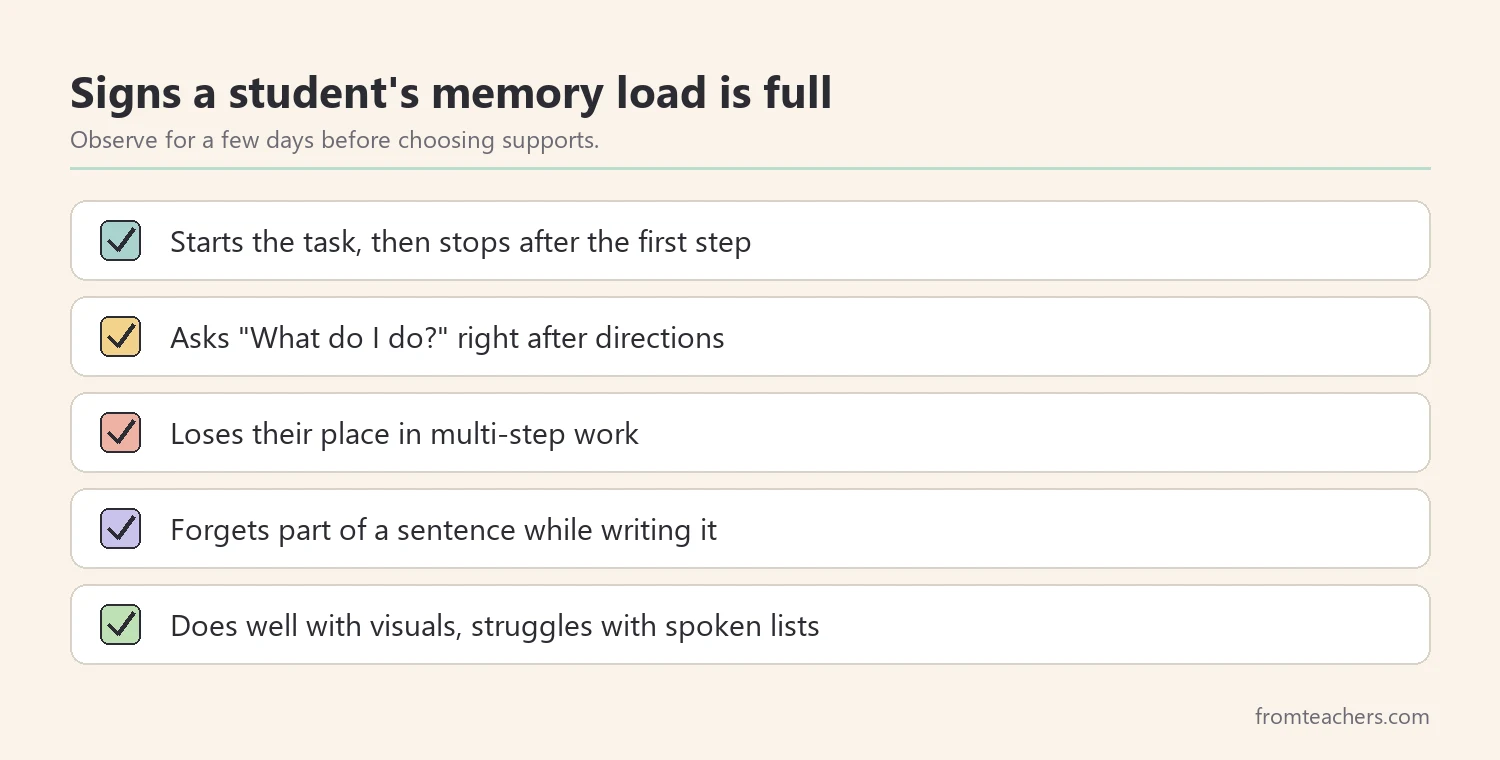
Next, look for patterns over a few days. When does the student struggle most? Often it is during spoken, multi-step directions, long math problems, or writing tasks that require holding ideas while spelling and punctuating at the same time.
Then, remember what these signs are not. A student who forgets directions is not lazy or careless. Their working memory is simply full. Seeing it this way changes how adults respond, from repeating louder to offering a support.
Students with ADHD, learning disabilities, and other needs often have working memory challenges. However, any student can become overloaded when a task asks for too much at once. The supports in this guide help many learners, not just those with a diagnosis.
| Task | What the student must hold in mind |
|---|---|
| Four spoken directions | Each step and its order |
| Two-step word problem | The question, numbers, and first answer |
| Writing a sentence | The idea, spelling, and punctuation |
Worked example. Lucas, a fictional third grader, follows one-step directions well but completes only about 3 of 10 multi-step directions in a week without re-asking. His teacher notes that he does much better when steps are written down.
2. Put information outside the head with memory aids for students
The fastest way to lighten the backpack is to keep information in front of the student. Visuals do exactly that. Checklists, step-by-step directions, picture cues, and first-then boards hold the information so the brain does not have to.
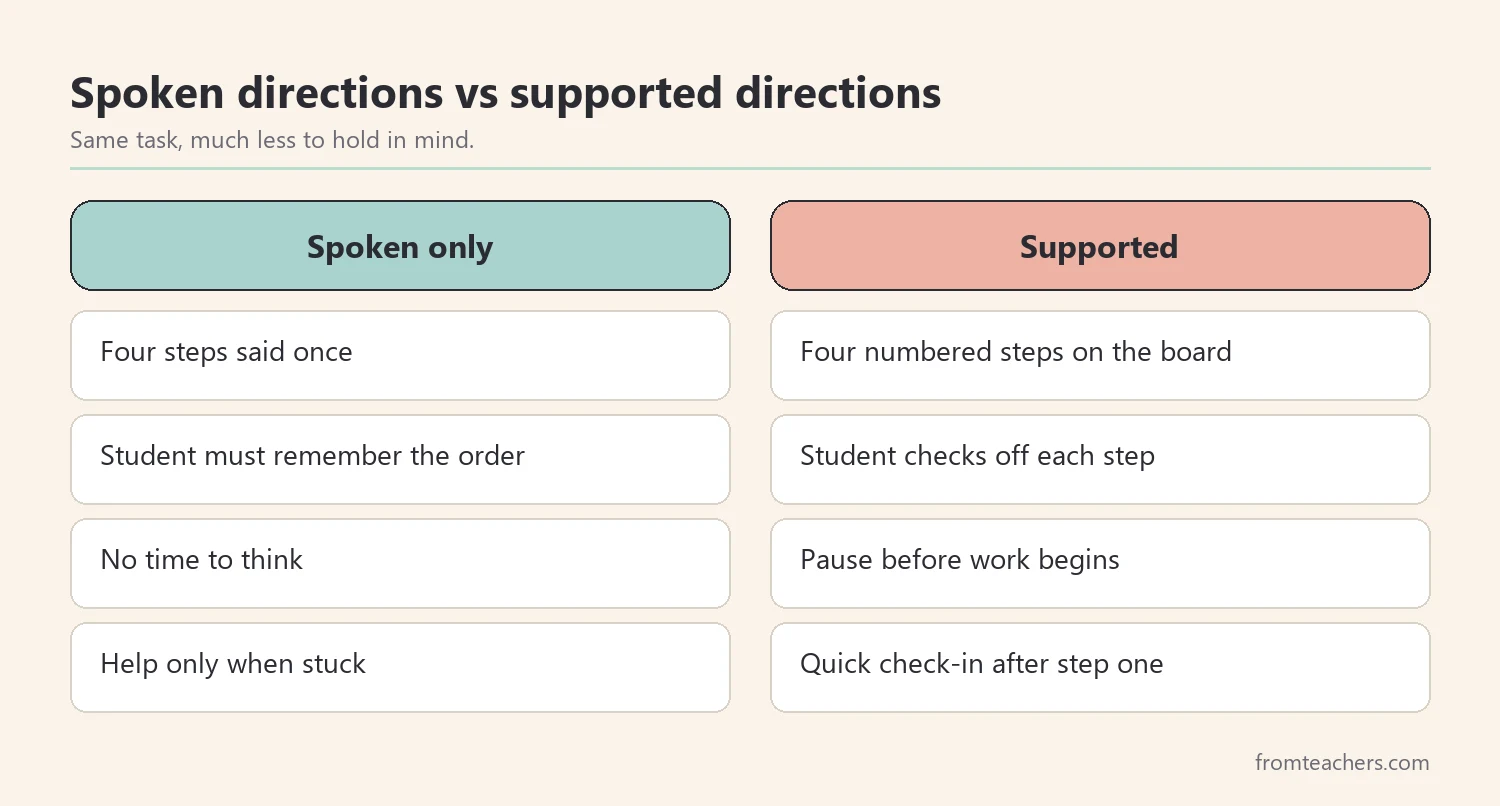
Next, add memory aids that work like temporary storage. Sticky notes, graphic organizers, word banks, and numbered steps let the student look back instead of trying to remember. For example, a word bank during writing frees space for ideas instead of spelling.
Write multi-step directions down every time, even when they feel simple. Number them. Leave them visible until the task is done. Students can then check off each step as they finish it.
A classroom poster gives everyone the same reminders. The Working Memory Support poster with eight strategies and “why it helps” notes lays out tools like visuals, memory aids, chunking, and check-ins, which makes it a useful reference for teachers, aides, and students.
Teach students how to use each aid, not just where it is. Model looking at the word bank before spelling a hard word, or touching the next step on a checklist before starting it. Many students ignore aids at first simply because using them is a new habit that nobody showed them.
Also, keep the aids simple. A cluttered desk full of cards becomes its own memory load. Choose the one or two aids that matter for the current task, and put the rest away.
Worked example. Lucas’s teacher writes numbered steps on a small whiteboard for each independent task. Lucas keeps a sticky note with the steps on his desk and checks each one off with a pencil.
3. Make information smaller: break tasks and chunk
When information is smaller, it fits in the backpack. So, break tasks into small steps. Give one tiny step at a time, check it off before moving on, and keep the next step visible. Small steps prevent overload and make tasks achievable.
Next, chunk information. Group related ideas together, highlight key words, and keep only the most important details. Chunking makes information easier to store and retrieve. For example, a phone number is easier to remember as three short groups than as ten separate digits.
| Before | After chunking |
|---|---|
| Ten spelling words in one list | Two groups of five, sorted by pattern |
| A full page of math problems | Three sections with a checkpoint after each |
| A long paragraph of directions | Three numbered steps with key words bold |
Then, think about how much you say at once. Give one or two directions, wait for the student to start, then give the next. This takes a little more time at first but often saves time overall because fewer students get lost.
Teach students to chunk on their own, too. Show them how to circle the numbers in a word problem, underline the question, and box the key word. Over time, these marks become a quick routine students use without being asked.
In addition, remove extra details that do not matter for the task. If students are practicing addition, a long story around the numbers may add memory load without adding learning. Trim the task to its core.
Worked example. Lucas’s math page is folded into three sections. He completes one section, shows his teacher, then unfolds the next. His teacher gives directions for one section at a time.
4. Help information stick with restating, multisensory practice, and time
Information that is repeated, used in several ways, and given time to settle is easier to recall. First, teach students to repeat or restate instructions. They can say the directions back, ask “So you want me to…?”, or read the directions twice. Repeating strengthens recall and confirms understanding.
Next, use multisensory strategies. Students can say it, write it, draw it, and act it out. Multiple pathways strengthen recall and understanding. For example, a student learning the steps of a science experiment might say each step, draw a quick sketch, and act out the order.
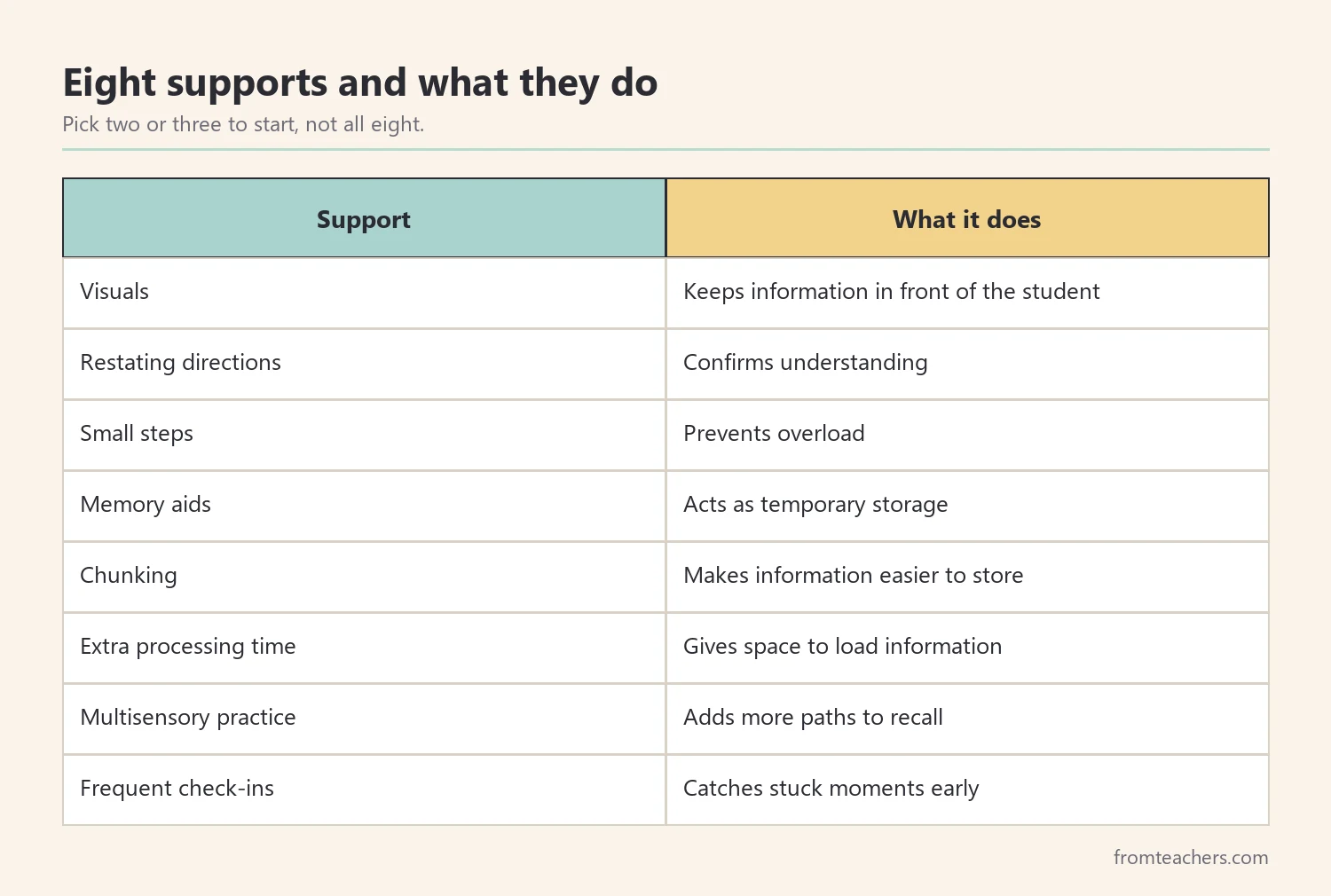
Then, allow extra time to process. Pause after giving directions, give students time to think, and slow down transitions. Working memory needs space to load, store, and use information. A five-second pause after a question can make a real difference. Count silently in your head so the pause feels natural.
Movement can help as well. Some students remember a sequence better when each step has a simple gesture, such as a tap on the desk for “write the date” or a thumbs-up for “check your work.” Keep gestures small and consistent so they support recall without becoming a distraction.
These memory aids for students work best when they become routine. If restating is part of every direction, students stop seeing it as a sign that they did something wrong. It becomes simply how the class works.
Worked example. After directions, Lucas’s teacher pauses, then asks him to say the steps back. Lucas restates them while touching each step on his sticky note. When learning new vocabulary, he says the word, writes it, and draws a quick picture.
5. Check in often and track progress
Regular check-ins prevent students from becoming stuck or overwhelmed. Short questions work well: “What’s your next step?” “Show me where you are.” “Do you need help remembering the directions?” A quick check-in after the first step often catches problems early.
Plan when check-ins happen rather than waiting for the student to look lost. A check-in after the first step and another at the halfway point covers most tasks. Students who know a check-in is coming often keep going instead of stopping to wait for help.
Keep check-ins brief and calm. The goal is to help the student find their place, not to quiz them. Point to the visual instead of repeating everything aloud.
Next, keep a weekly record. Count multi-step directions given, how many the student completed without re-asking, and how many check-ins were needed. These numbers show whether the supports are lightening the load.
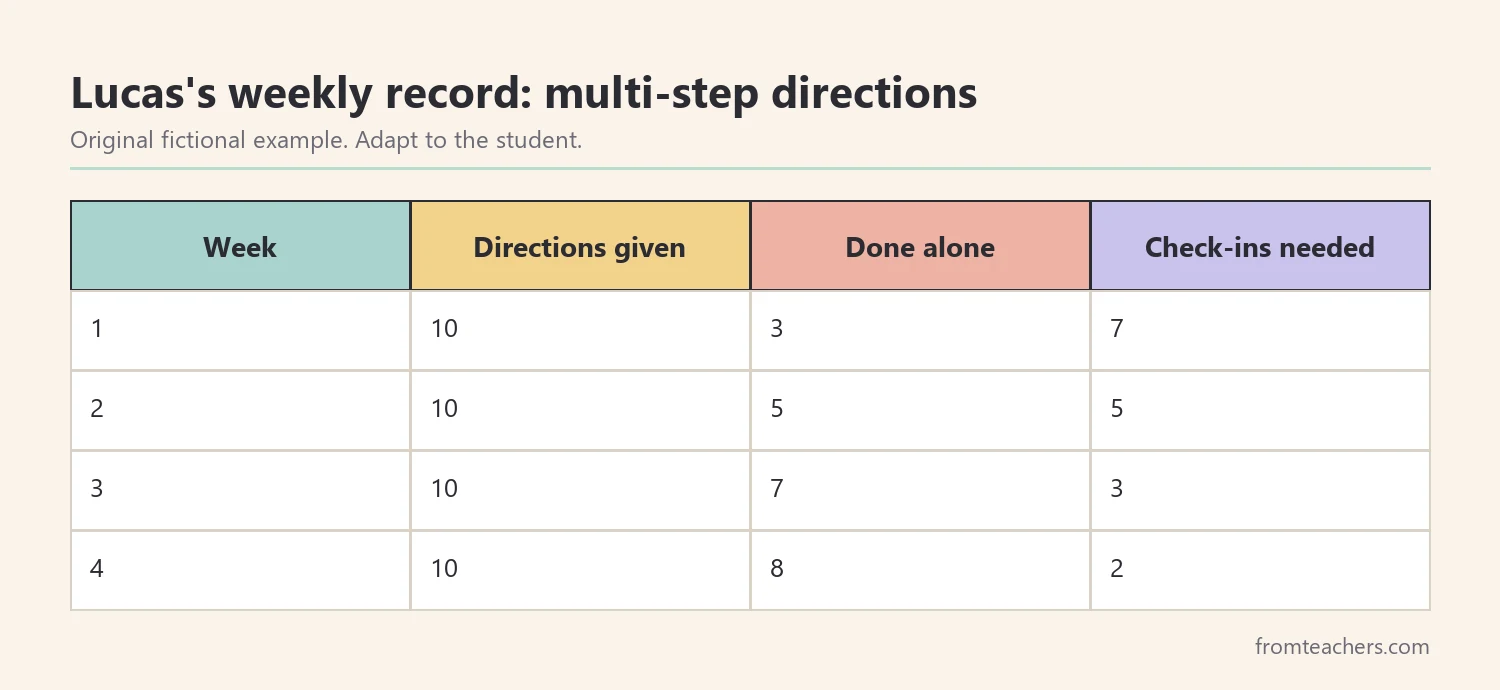
In this example, Lucas completed 3 of 10 multi-step directions without re-asking in week one and 8 of 10 in week four. His check-ins dropped from 7 to 2. That trend shows the supports are working.
Use the data to decide what to change. If progress stalls, try a different support from the list, or make steps even smaller. If the student is doing well, start fading one support at a time, such as moving from a teacher-written sticky note to one the student writes.
Ask the student which memory aids for students in your room help them most. Even young learners can point to the tool they like best. Their answer helps you decide what to keep, and it builds the self-awareness they will need to choose their own supports in later grades.
Share what works with the family and, where relevant, the IEP or 504 team. Some supports, like written directions or extra processing time, may already be listed as accommodations. Consistent supports across settings help most.
Worked example. After four weeks, Lucas starts writing his own step lists. His teacher keeps the folded math sections and the restating routine, and shares the record at his next team meeting.
Common mistakes and how to avoid them
- Repeating directions louder. Fix: write them down and number the steps.
- Adding every support at once. Fix: start with two or three and add more only if needed.
- Removing visuals too soon. Fix: fade one support at a time based on data.
- Giving no time to think. Fix: pause after directions and questions.
- Treating forgetting as carelessness. Fix: see it as a full backpack and lighten the load.
Questions teachers and parents ask about memory aids for students
What is working memory, in simple terms?
It is the brain’s short-term workspace for holding and using information, such as remembering directions while following them. It has limited space. When it fills up, information gets lost.
Can working memory be improved?
The most practical focus in school is reducing the load and teaching strategies, so students can succeed now. Research on training working memory directly is mixed. Qualified professionals can advise on specific programs.
Are these supports a crutch?
No. Adults use lists, calendars, and notes every day. Supports let students focus on learning, and many students later create their own aids independently.
Which support should I try first?
Written, numbered directions are a strong first choice because they help many students at once. Add a check-in after the first step. Then, look at your record and adjust.
How can parents help at home?
Give one or two directions at a time, write down routines, and use simple checklists for homework and mornings. Ask the student to say the plan back. Share what works with the teacher.
Related reading: ADHD in children: classroom and home support, Dyslexia in education guide, and Accommodations vs modifications in special education.
A companion resource for memory aids for students:
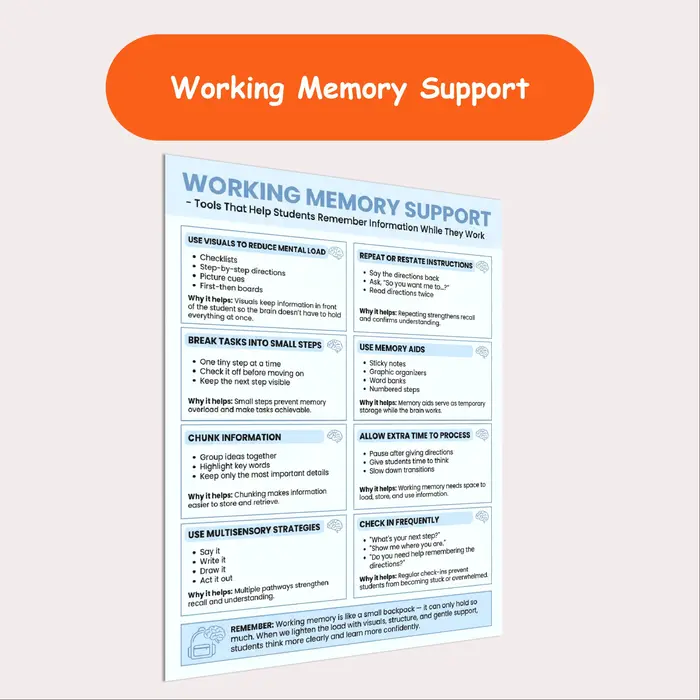
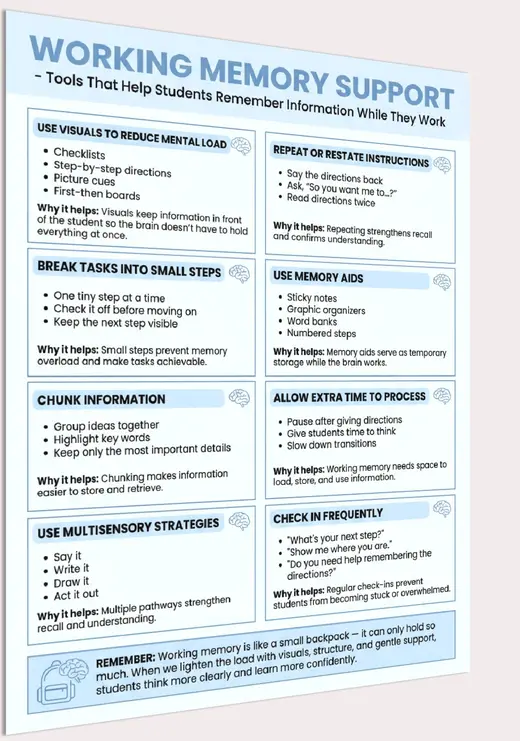
Working Memory Support Poster: a printable executive function poster showing eight tools that help students remember information while they work, each with a “why it helps” note. A practical special education visual support.
Sources and scope
- Understood.org: practical articles on working memory and executive function at school and home.
- IRIS Center, Vanderbilt University: free modules on evidence-based instructional practices.
- CAST UDL Guidelines: a framework for designing lessons with multiple means of representation and expression.
- CHADD: information for families and educators on ADHD and executive function.
This guide covers everyday classroom and home supports for working memory. It does not cover diagnosis, cognitive testing, or specific training programs, which belong to qualified professionals.
Key takeaways
- Memory aids for students lighten a small, easily filled working memory.
- Keep information visible with checklists, numbered steps, and word banks.
- Break tasks into small steps and chunk information.
- Restate directions, use multisensory practice, and allow time to process.
- Check in often, track progress, and fade supports one at a time.









Leave a Comment